

Kali365 Device-Code Phishing Turns an EFT Payment Lure into Microsoft 365 Token Theft
Table of Contents
Anatomy of the EFT payment phishing email
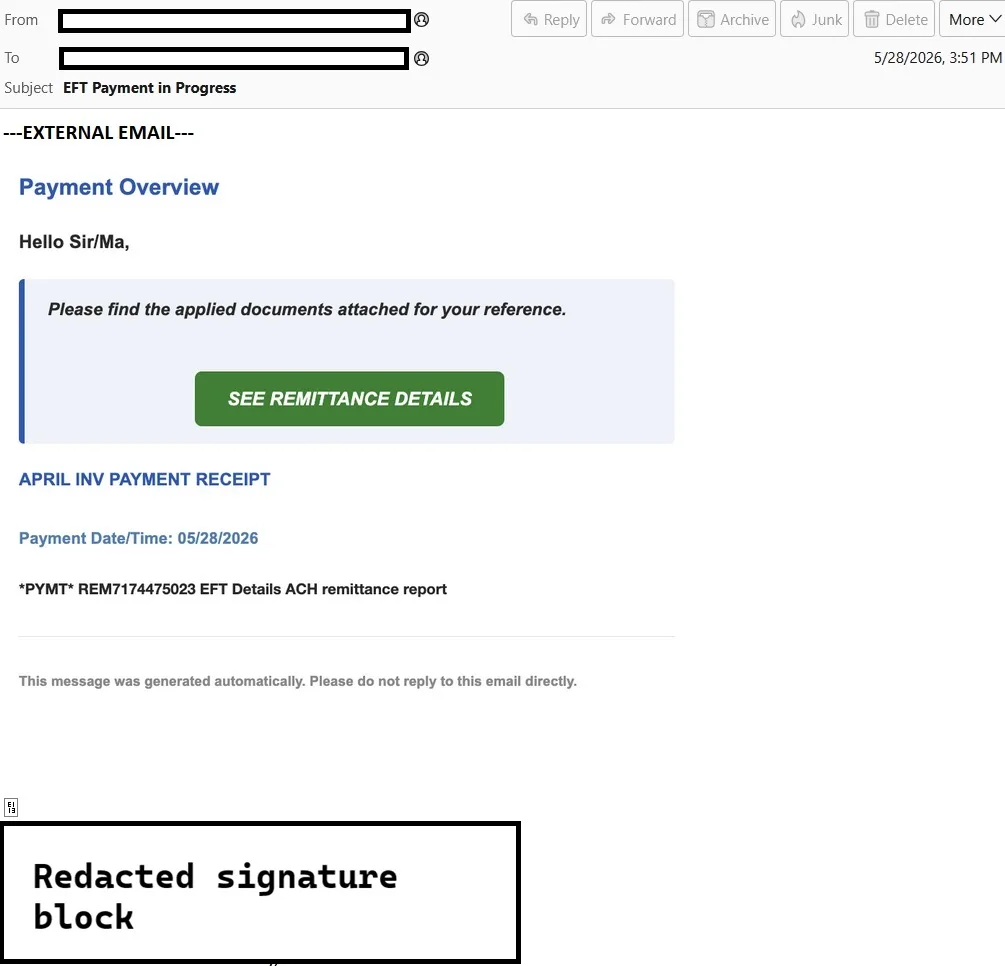
The attack begins with an external email using a payment and remittance theme.
The subject line is direct and financially relevant:
EFT Payment in Progress
This is a strong lure for accounting, finance, property management, procurement, and operations teams. EFT, ACH, invoice, remittance, and payment-receipt language is routinely used in legitimate business workflows, so the recipient has a plausible reason to interact quickly.
The body of the email is designed as a payment notification. It opens with:
Payment Overview
The greeting is generic:
Hello Sir/Ma,
This is one of the weaker linguistic points in the lure, but the surrounding payment context makes the email feel routine. The message then presents a highlighted document-style panel with the text:
Please find the applied documents attached for your reference.
A green call-to-action button invites the recipient to continue:
SEE REMITTANCE DETAILS
Below the button, the email reinforces the business context with invoice and payment wording:
APRIL INV PAYMENT RECEIPT
It also includes a payment timestamp:
Payment Date/Time: 05/28/2026
The message then references an apparent payment or remittance identifier:
*PYMT* REM7174475023 EFT Details ACH remittance report
Several details are worth highlighting:
- The email uses financial urgency without sounding overly dramatic. It does not claim that a payment failed or that an account will be suspended. Instead, it looks like a routine payment receipt.
- The lure is document-centric. The user is not immediately asked to “log in”; they are asked to view remittance details.
- The email uses a branded signature and a real-world business context to reduce suspicion.
- The phrase “Hello Sir/Ma” and the generic “applied documents” wording are suspicious, but not necessarily enough to stop a busy user from clicking.
What happens after the click
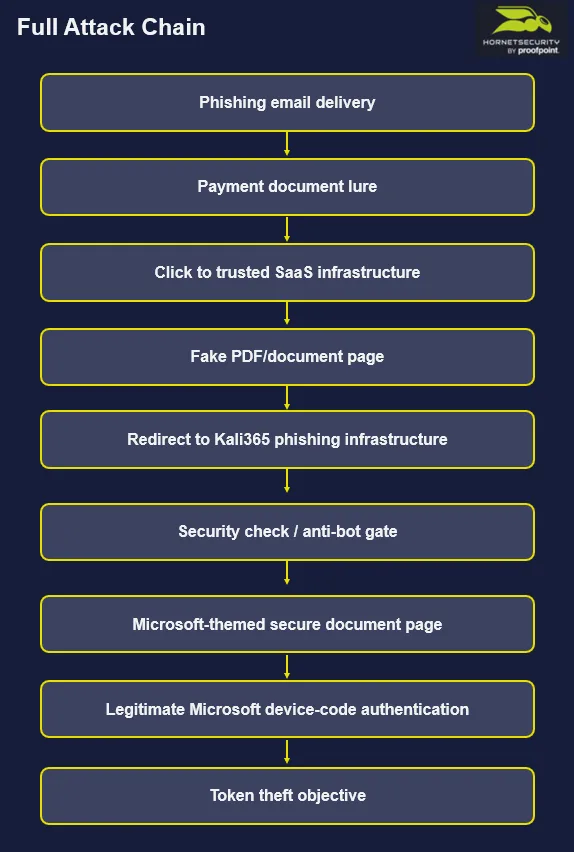
The first observed URL in the chain was hosted on a legitimate third-party SaaS domain:
hxxps://mixpanel[.]com/public/5TwfnfSBNLp72xaBMcuEwT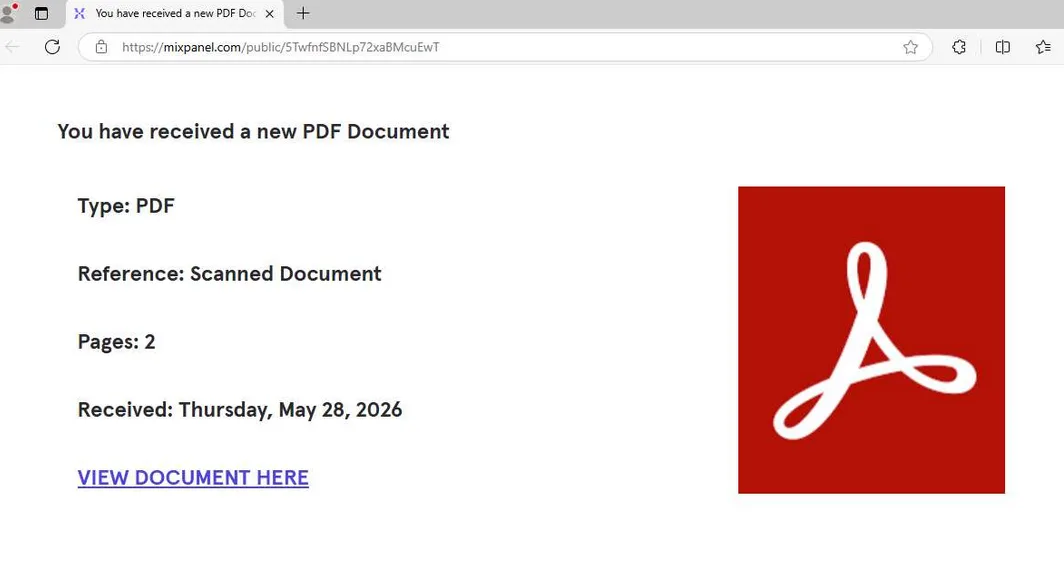
This is an important part of the attack. The first click does not immediately land on an obviously malicious domain. Instead, the victim is taken to a public page on a recognizable SaaS platform.
The first-stage page presents a simple document lure. It tells the victim that they have received a new PDF document, describes it as a scanned document, shows basic document metadata, and provides a prominent button to view it.
This stage acts as a confidence-building step. The victim has already come from a payment-themed email and is now shown a document-themed page. The attack is gradually moving them from “payment receipt” to “secure document access.”
This matters because modern phishing campaigns often avoid showing the most suspicious page first. Instead, they use layered infrastructure and staged redirects to make the interaction feel normal.
The Kali365 landing page
After the first-stage document lure, the session moves to:
hxxps://6civt6gowo[.]clearprocesses[.]de/l/375eYPgUe-4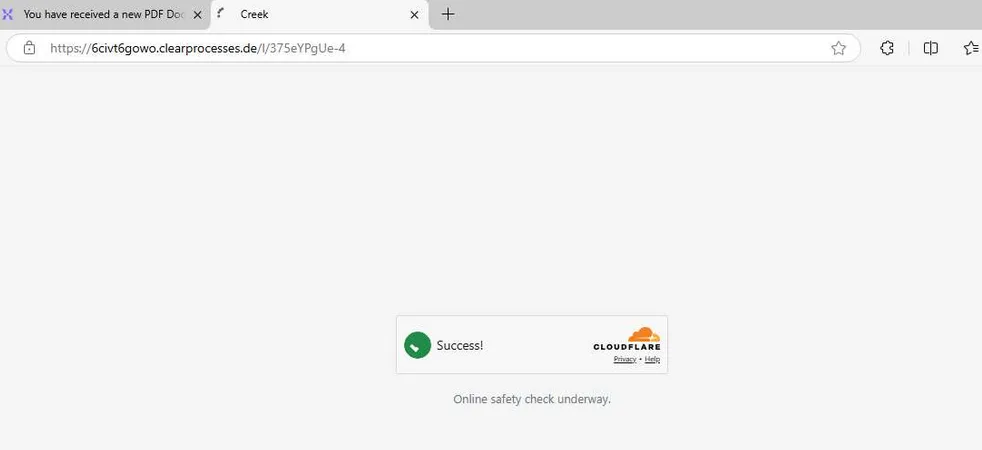
At this point, the attack introduces an “online safety check” style interstitial. The victim sees a verification step before reaching the phishing content.
This type of step has two effects. For the victim, it can create the impression that the page is protected or professionally hosted. For defenders and automated scanners, it adds friction and may reduce the visibility of the final phishing page.
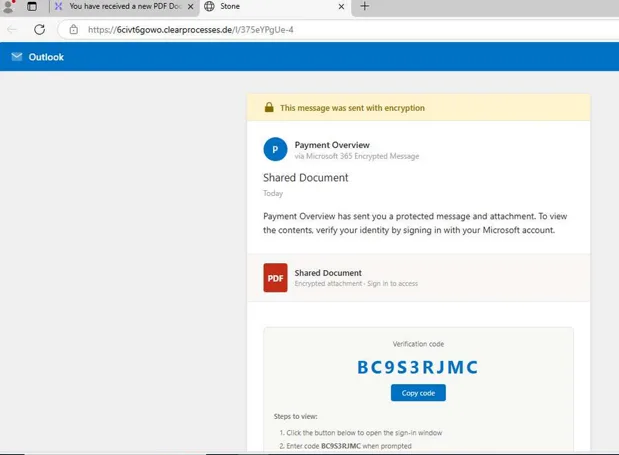
After the verification step, the page changes to a Microsoft-themed secure-document experience. The page uses Outlook-style branding and message-encryption language. It refers to a shared document and shows a PDF tile.
The critical element is the short code displayed to the victim. The page instructs the user to open a Microsoft sign-in window, enter the code when prompted, authenticate with their Microsoft account, and then return to the page to read the message.
This is the key transition in the attack. The phishing page is not trying to collect the user’s password directly. Instead, it is coaching the victim into completing a legitimate Microsoft device-code authentication flow that was initiated by the attacker.
How the Microsoft device-code phishing works
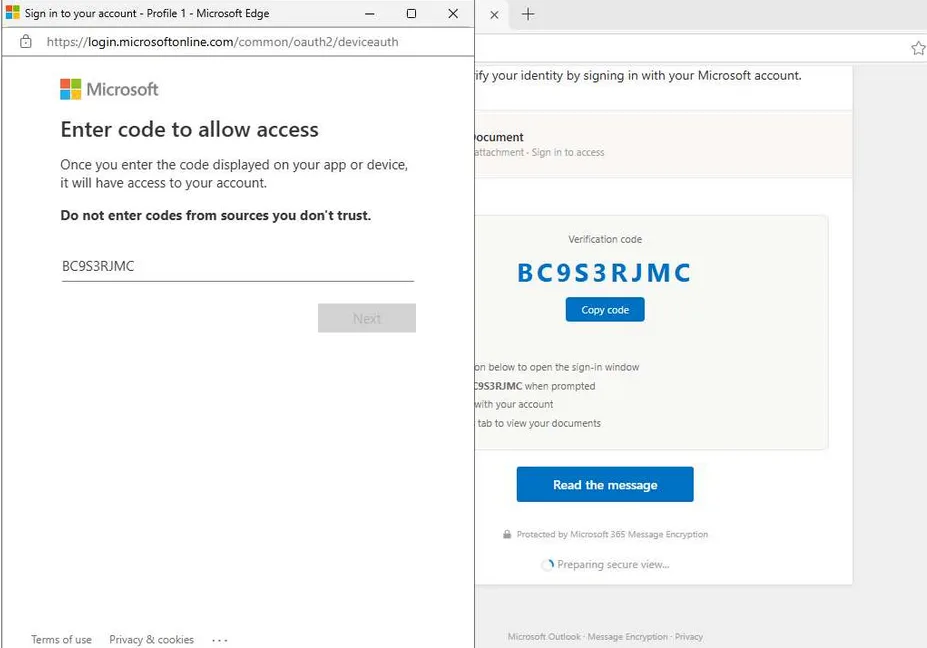
Microsoft’s OAuth 2.0 device authorization grant is a legitimate authentication flow. It is designed for input-constrained devices such as smart TVs, IoT devices, printers, or other devices where entering credentials directly is difficult. In that flow, a device asks the user to visit a verification page in a browser on another device, enter a short user code, and complete sign-in. Once the user signs in, the requesting device can obtain access and refresh tokens.
Attackers abuse this flow by reversing the trust model.
In a legitimate scenario, the user owns or controls the device requesting authentication.
In this attack, the attacker controls the session requesting authentication.
The user is tricked into entering the attacker-provided code on a real Microsoft page. After the victim signs in and completes MFA, Microsoft issues valid tokens to the session that requested the device code.
That means the victim may see a genuine Microsoft login page, a real Microsoft domain, and a normal MFA challenge. From the user’s perspective, nothing necessarily looks like a traditional fake login page.
The malicious part is not the Microsoft page itself. The malicious part is that the victim is authorizing a session they do not control.
Microsoft’s prior research into device-code phishing explains why this is attractive to attackers: the victim authenticates normally, while the attacker receives tokens that can be used to access the victim’s account and data. Microsoft notes that these tokens can allow access to services such as email or cloud storage without needing the password, while the tokens remain valid.
In the observed sample, the chain reaches the legitimate Microsoft device-authentication experience. The victim is shown a short code, enters it into the Microsoft flow, and is then prompted to sign in. The visible Microsoft prompt indicates that the user is signing in to Microsoft Authentication Broker on another device.
This is highly significant. The attack is not simply stealing credentials. It is attempting to obtain authenticated Microsoft 365 access through OAuth token capture.
How this sample compares with the FBI alert
The observed attack aligns closely with the FBI’s description of Kali365 at the strategic level.
The FBI alert describes a Phishing-as-a-Service kit that enables attackers to obtain Microsoft 365 access tokens, bypass MFA without intercepting credentials, and gain persistent access to Microsoft 365 environments through OAuth token capture.
This sample shows the same core technique:
- The victim receives a business-themed phishing email.
- The lure leads to a document-access workflow.
- The victim is shown a device code.
- The victim is pushed toward a legitimate Microsoft verification and sign-in flow.
- The attacker’s likely objective is Microsoft 365 token theft rather than direct password collection.
There are also important differences.
The FBI’s simplified attack sequence describes a phishing email that contains the device code and instructions to visit Microsoft’s verification page. In the observed sample, the email does not present the device code directly. Instead, the email leads to a first-stage hosted document lure, then to a second-stage phishing page, and only then is the victim shown the device code.
This is not a contradiction. It is a more layered operational variant of the same technique.
The FBI alert also describes Kali365 more broadly as a PhaaS platform with AI-generated phishing lures, campaign templates, tracking dashboards, and OAuth capture capabilities. Those wider platform features are not all visible in this single email chain. What is visible here is the device-code phishing branch of the tradecraft.
Detection clues and defensive takeaways
This attack demonstrates why defenders should not rely only on whether the final login page is legitimate. In this case, the Microsoft authentication page is legitimate. The fraud happens before the victim reaches it.
Useful detection and triage signals include:
- Unexpected payment, invoice, EFT, ACH, remittance, or receipt emails that lead to external document-hosting or public SaaS URLs.
- Multi-stage click chains where a trusted SaaS page redirects to a newly observed or unrelated domain.
- Cloudflare-style or CAPTCHA-style interstitials appearing in front of document access pages.
- Pages that display a short code and instruct the user to open a Microsoft sign-in page.
- Authentication events involving Microsoft device-code flow where the business need is unclear.
- Sign-ins involving Microsoft Authentication Broker or device-code authentication patterns that do not match expected user behavior.
Microsoft recommends that organizations get as close as possible to a unilateral block on device-code flow, auditing existing use first and only allowing it for well-documented and secured use cases. Microsoft also recommends using Conditional Access policies to block device-code flow where it is not needed.
Microsoft’s managed Conditional Access documentation also states that device-code flow is rarely used by customers but frequently used by attackers, and that blocking it helps remove this attack vector.
Final takeaway
Kali365-style device-code phishing changes the user-awareness problem.
Users have long been trained to check whether a login page looks real. In this attack, that advice is not enough. The final login page can be real, the MFA prompt can be real, and the Microsoft domain can be real — while the session being authorized still belongs to the attacker.
The suspicious moment is not only the login page. It is the instruction to enter a short code provided by an email or document page.
For defenders, this means the best opportunities to stop the attack are earlier in the chain: email filtering, URL analysis, redirect-chain inspection, user reporting, and Conditional Access controls that restrict device-code authentication before attackers can turn a secure-document lure into token-based Microsoft 365 access.
Additional activity observed
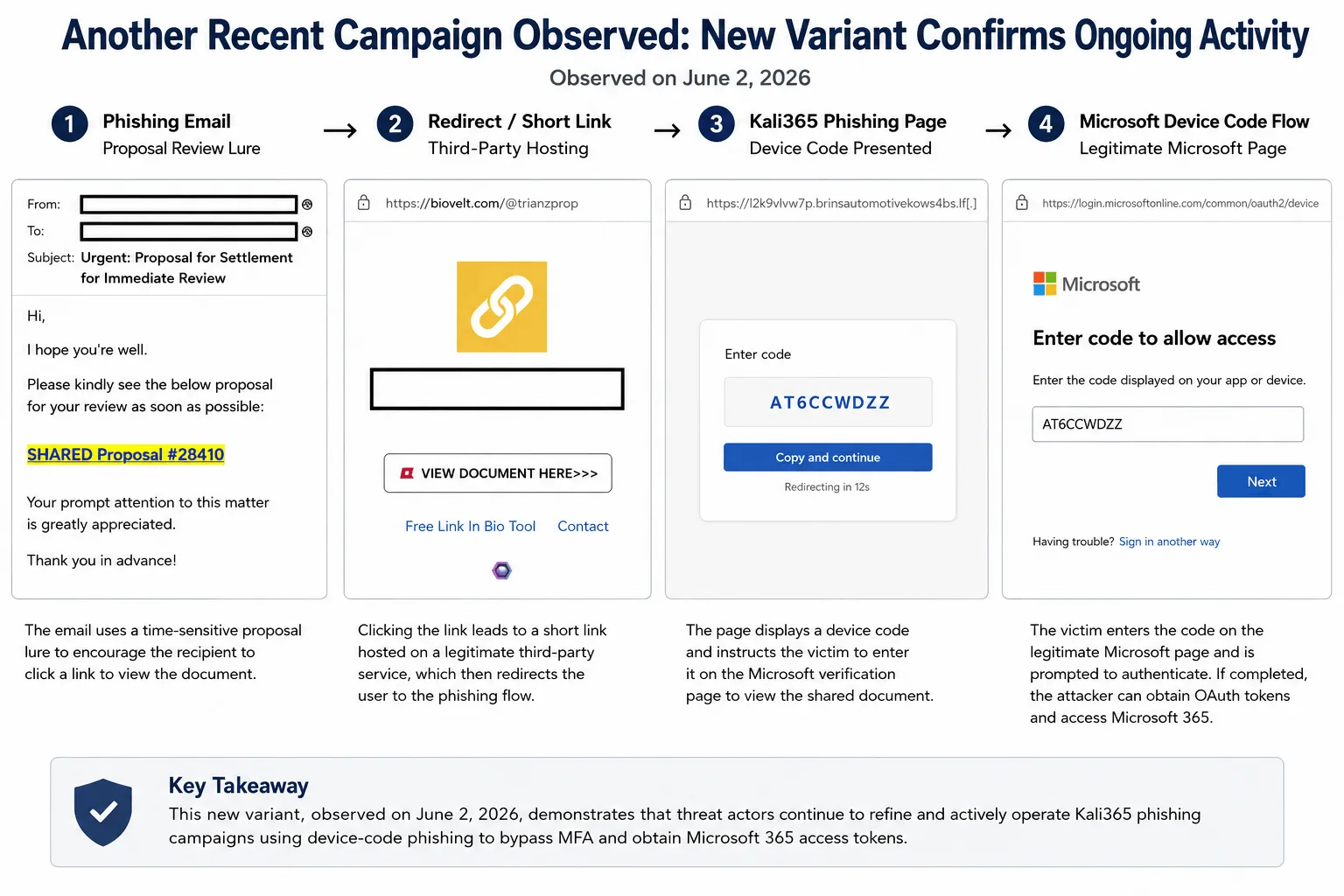
A more recent variant of this activity was observed on June 2, 2026, indicating that this device-code phishing tradecraft remains active. While the lure changed from an EFT payment notification to an urgent proposal review theme, the overall pattern remained consistent: the victim was directed from an email lure to a third-party hosted page, then to a phishing page displaying a short device code, and finally toward the legitimate Microsoft device-code authentication flow.
This variant reinforces the key defensive lesson: the Microsoft authentication page can be legitimate, while the session being authorized still belongs to the attacker.
IoCs
| Type | Value | Description |
|---|---|---|
| URL | hxxps://mixpanel[.]com/public/5TwfnfSBNLp72xaBMcuEwT | First-stage hosted document lure |
| URL | hxxps://biovelt[.]com/@trianzprop | First-stage hosted document lure |
| URL | hxxps://6civt6gowo[.]clearprocesses[.]de/l/375eYPgUe-4 | Second-stage Kali365 phishing page |
| URL | hxxps://l2k9vlvw7p[.]brinautomotivekow[.]sbs/l/fjOZveI_IVw | Second-stage Kali365 phishing page |
| Domain | 6civt6gowo[.]clearprocesses[.]de | Phishing subdomain |
| Domain | l2k9vlvw7p[.]brinautomotivekow[.]sbs | Phishing subdomain |
| IP | 104.21.28[.]254 | Observed IP indicator |