

Entra ID and Point in Time Restoration: Total Recovery for the Modern MSP
Most of us make certain assumptions about cloud IT infrastructure: it’ll be online (nearly) always, we can access it from anywhere, it’s secure and protected, and the cloud provider is “taking care of it”.
If you take a step back however and look at the overall design of Microsoft 365 and Entra ID, you’ll realize that the cornerstone is identity. Even if you have backups of every document, every list, and every configuration setting (good luck with that), if your administrators can’t login, your users can’t access their data, and applications can’t work because they can’t authenticate – your business is dead in the water.
And while most of us think of Entra ID (formerly known as Azure Active Directory, AAD) as a place to store user, device and group accounts, it’s far more than that.
Table of Contents
Application Dependencies On Entra ID
Every application that integrates in any way with the underlying Microsoft 365 platform (over 700 Microsoft ones, plus every third party one your administrators or users have added) has essential configuration and authentication settings stored in Entra ID, without which they won’t work.
Entra ID also controls access to Teams shared channels in other tenants and all your Conditional Access policies that allow or blocks sign-ins from risky users or untrusted devices live in Entra ID. If you’re using Identity Governance, you’ll have entitlements and access packages that provide automated assignment of resources and applications to the right users at the right time.
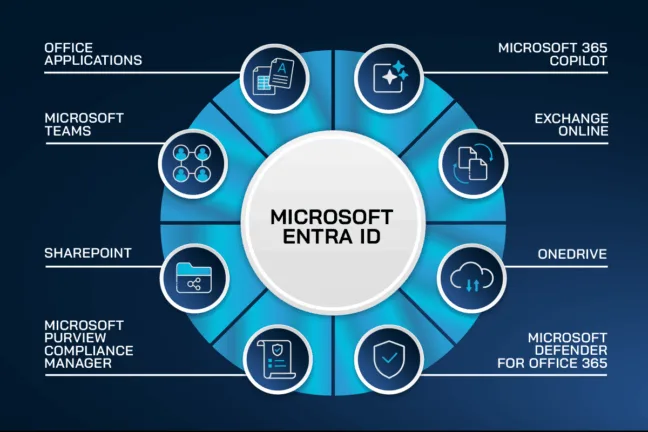
And Entra isn’t an island, most enterprises are in a hybrid mode, where they have Windows Server Active Directory on premises as the source of truth for user and groups accounts, which are then synchronized to Entra ID.
Many organizations also rely on HR systems for the initial set up of new users, and for controlling access to applications and resources.
Historical Outages Affecting entire regions
Those of us who were around in the early days of Microsoft 365 know that AAD had occasional widespread outages, affecting whole regions and sometimes even global access for swathes of users for many hours.
Thankfully, those large outages are rare today, due to Microsoft re-architecting the underlying platform to be much more resilient, with smaller “shards” serving fewer tenants, and backup authentication seamlessly taking over when the primary platform isn’t responding.
But outages do still happen, a stark reminder that if you can’t log in, nothing else works either.
And if you’re an MSP, being responsible for other people’s tenants, taking ownership of this risk by providing proper backup, rather than just relying on Microsoft is the prudent thing to do.
Cybersecurity Report 2026
The AI-Driven Acceleration of Global Threats
TOP Risks to your Entra ID tenant
Handling Platform Outages
Any business must take into account several different risks to their identity management platform, which sits at the heart of everything in the Microsoft cloud. The most obvious is an outage of the platform itself.
The only thing to do in this situation is wait for Microsoft to bring service back and manage communication with the business in the meantime (using a channel that doesn’t depend on M365). Thankfully, these types of outages are very rare.
Human Errors and Misconfigurations
More likely are human errors, where an administrator deletes the wrong group or user account, changes the scope of a Conditional Access policy or a similar error. A big risk factor here is automation and scripts where a small change can impact 200 groups instead of the intended one, for example.
The sinister version of this is a malicious actor who gains access to your Identity and Access Management (IAM) solution, whether that’s Active Directory, Entra ID or both.
Depending on their level of access and goals (espionage vs ransomware) they might delete every other administrator account except for their own or simply create accounts and service principals / enterprise applications to ensure continued access if you discover them and think you’ve evicted them from the environment.
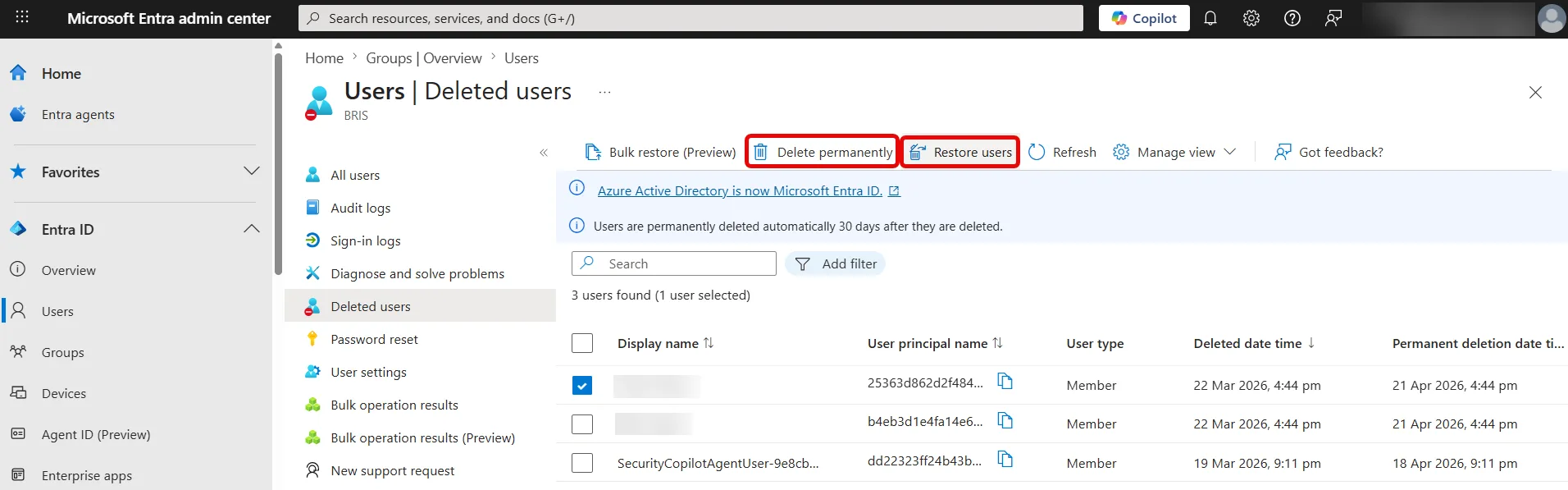
Deleted user / group and conditional access policy objects have a built in 30 day “soft delete” recycle bin, but if you have admin access you can delete accounts out of these locations to ensure that the business can’t easily recover.
Subtle Corruption and Backup Attacks
Another more insidious approach is subtly altering accounts, group memberships and access policies to corrupt the identity platform itself. 15% of ransomware attacks specifically target backups to further cripple the business and increase the likelihood of a payout.
In all these cases, you need more than the built-in tools for a trustworthy Entra ID restoration. For MSPs the impact is even greater. Imagine recreating hundreds of groups or user accounts and their relationships and access settings manually based on documentation as non-billable hours, compared to a point-in-time recovery with a few clicks.
Why Your Current Backup is Leaving a Gap
Most businesses back up their on-premises Domain Controller servers but even with hybrid architecture this is only half the story. Yes, you can now restore users and groups on-premises (provided your backup hasn’t been tampered with by the criminals) and have them synch to Entra ID, but there are many other configurations that only exist in Entra ID.
If your organization is only using Entra ID, most businesses have no backup of their identity platform at all, leaving a huge gap. Imagine having a verified backup of every document in SharePoint and OneDrive, along with every mailbox but not being able to use it because none of the user and group accounts that have permissions to them exist.
Ultimately, it’s important to understand that Microsoft does not take responsibility for your data in Entra ID / Microsoft 365, here’s a quote from the Microsoft Services Agreement:
We strive to keep the Services up and running; however, all online services suffer occasional disruptions and outages, and Microsoft is not liable for any disruption or loss you may suffer as a result. In the event of an outage, you may not be able to retrieve Your Content or Data that you’ve stored. We recommend that you regularly backup Your Content and Data that you store on the Services or store using Third-Party Apps and Services.
Native tools in Entra ID and their limitations
As mentioned, user, group and CA policy objects are temporarily stored in a recycle bin for 30 days after deletion, known as soft-delete, after which they’re hard-deleted. Here you can see some deleted users, along with the option to restore them or hard delete them.
Recently Microsoft has added a Backup and recovery blade (in preview at the time of writing). It’s on by default, and takes a snapshot once every 24 hours, keeps five days’ worth, and lets you compare the current state with any of those points in time through Difference Reports.
This feature is not about full Entra ID recovery, it’s more about being able to see individual changes to an object over time and be able to roll these back.
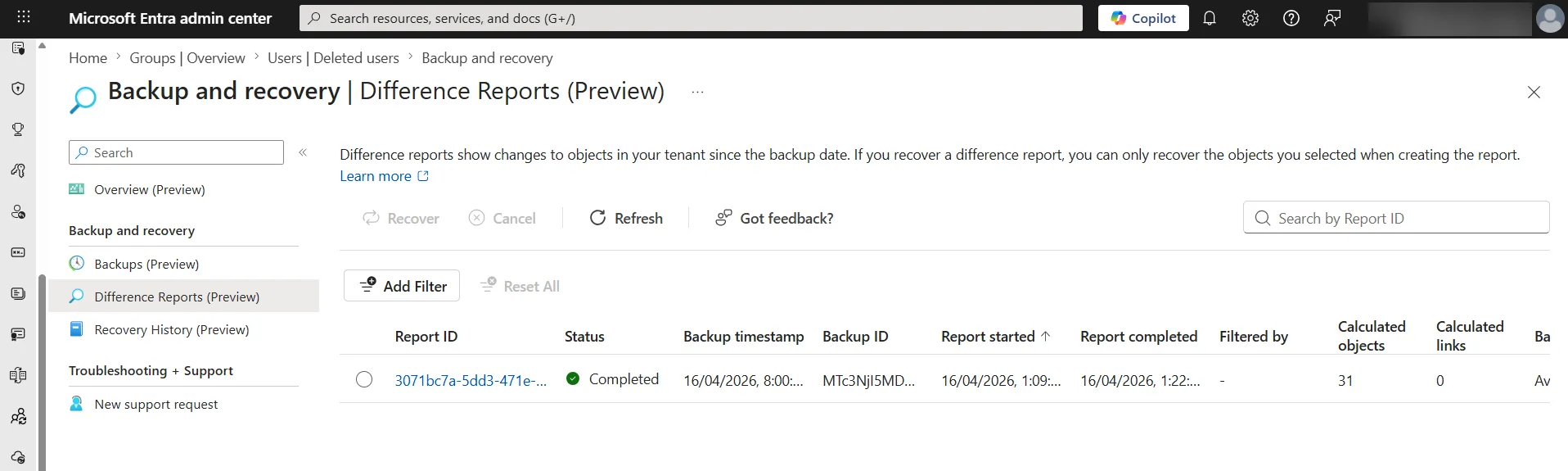
It’s worth noting that we don’t know if this functionality will be part of costly licensing when it becomes generally available, nor if more “look back” time than five days will be available, or more frequent backups than once every 24 hours.
Most concerning though is that these backups are stored in the platform itself, so if there’s an issue with Entra ID, you won’t be able to use this feature to recover.
It’s akin to storing the backup tapes next to the server and being surprised that recovery is impossible when both are stolen or destroyed when the building burns down.
Introducing Entra ID Restoration
True backup takes a copy of all data and stores it separately to the production source system. Traditionally we did this with tape or hard-drive backups, they were sent off-site and if there was a problem with the source data, we could recover from our safe backups.
Today, even on-premises servers are often backed up to the cloud, which still fulfills the criteria – if servers are destroyed or compromised, a copy exists in another system. But as you’ve seen, the native tools in Entra ID aren’t backup solutions in this sense, more of a minimum functionality, relying on the underlying platform being available.
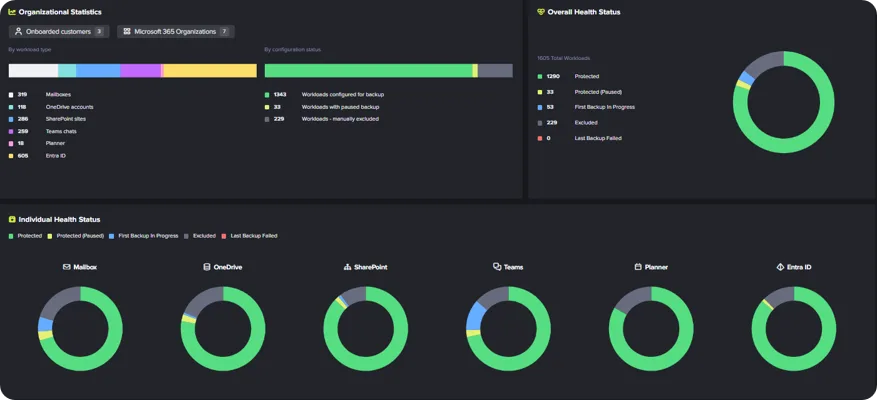
Hornetsecurity’s 365 Total Backup takes a different approach. Every mailbox, Teams Chat, Planner Group plan, OneNote document, OneDrive for Business and SharePoint site is backed up several times a day, and stored in our private cloud (in multiple datacenters to protect against outages) as immutable storage, protected with AES, 256-bit encryption.
And we’re extending this protection to Entra ID users and group accounts which are backed up and protected in the same way, for Entra ID restoration. Retention can be set up to 10 years.
Deleted or compromised user accounts can be restored individually or in bulk, with the option of resetting everyone’s password to the same temporary one or assigning an individual password to each restored user.
Group based licensing isn’t restored, and guest accounts can be exported but not restored automatically. Conditional access policy backup will also be included soon.
Befitting an enterprise backup solution, there’s end user self-service for restoring mailboxes or individual items, as well as documents in OneDrive and OneNote notebooks. On the administrative side you need two administrator accounts to delete / change / disable backups or change retention periods, affectionally known as Four-Eye Approval.
While 365 Total Backup provides unlimited storage, the current restoration process also allows executing a full restore of all Users or Groups on per-workload basis, meaning that each workload, such as mailbox, Teams Chat, Planner, OneNote, OneDrive, and SharePoint can be restored separately.
The Power of Point-in-Time Recovery & Sovereignty
User and group objects can be restored to any restore point that’s been saved, this includes metadata and relationships, providing a seamless experience for the organization and the user themselves. This is real disaster recovery for identities in action.
For auditing and compliance (both GDPR and HIPAA require data to be retrievable and portable outside the primary cloud provided) you can easily access and export backup data for reporting.
The true power of 365 Total Backup comes from being able to back up your identities to a separate platform (you pick the region), where your data sovereignty is guaranteed, along with data recovery of your documents and emails.
Protect the Identity at the Heart of Your Business
A backup that only saves files is only doing half the job. Ensure your organization can recover its users and groups with a single click. By choosing 365 Total Backup, you get:
- Comprehensive Entra ID Restoration: Recreate deleted users and groups, including metadata and relationships, directly in your tenant.
- True Data Sovereignty: Break the single point of failure with redundant, independent storage outside of the primary cloud provider.
- Hassle-Free Scalability: Enjoy unlimited storage and a transparent, all-inclusive pricing model that grows with your business.
- Bulletproof Continuity: Utilize Point-in-Time recovery to “undo” mass-deletions or ransomware attacks in seconds.

If you are ready to secure your tenant and your identity infrastructure, schedule a demo today to see how Hornetsecurity helps you start saving time and securing your most valuable assets.

The MSP Playbook 2026
The MSP Playbook provides MSPs with practical strategies for operating more efficiently across several business areas and remaining competitive in our rapidly evolving industry.
Conclusion: Total Backup Means Total Control
When your identity platform isn’t working no one can work. Attackers know that identity is the weak point in most organizations which is why it’s the focus for so many attacks, and once in, escalating privileges and being able to interfere with other admin identities is core to their success.
The only way to completely protect your entire system, not just documents and data, lies in protecting your identity platform along with the data. Microsoft provides productivity, Hornetsecurity brings resilience, and makes it possible to recover from a completely compromised tenant.
365 Total Backup does exactly this and provides Entra ID restoration which might just save the day on what could have been the worst day of your career.
FAQ
What risks does an organization face with Entra ID?
Organizations face risks such as outages, human errors like accidental deletions, and potential malicious actors who could compromise access to identity management solutions. At the moment, Microsoft 365 does not include a native feature for full Entra ID restoration, which is crucial given that identity management is central to all cloud operations.
What advantages does Point-in-Time recovery provide for organizations?
Point-in-Time recovery allows organizations to restore user and group objects, along with their metadata and relationships, ensuring seamless reinstatement in the event of deletions or attacks.
What distinguishes Hornetsecurity’s 365 Total Backup approach?
Hornetsecurity’s 365 Total Backup creates separate, comprehensive backups of all data, including user accounts and configurations, and stores them in a secure, immutable environment for up to 10 years.