

MSP Vendor Management: A Practical Guide to Reducing Tool Sprawl
MSP vendor management is no longer a quiet procurement task for managed service providers; it is a growth, margin, and security issue. Most MSPs do not create tool sprawl on purpose. It usually builds; one client request, one renewal, and one “quick fix” at a time.
This guide by Hornetsecurity explains how IT MSPs can manage cybersecurity vendors for their Microsoft 365 customers. The problem is clear but tough to solve: clients need strong and suitable tools. However, having many disconnected vendors can make it harder to see what’s happening, slow down service delivery, and reduce profits.
Table of Contents
What is MSP vendor management?
MSP vendor management is the process of selecting, standardizing, monitoring, and rationalizing the vendors an MSP uses to deliver services securely and profitably across customers. In a Microsoft 365 security context, it covers far more than buying licenses or tracking renewal dates.
Good vendor management done well helps the MSP work smarter, not harder: fewer one-off workflows, clearer ownership, and a stack that supports the service model instead of fighting it.
Why vendor sprawl hurts managed service providers
Vendor sprawl causes problems in operations. Technicians are forced to deal with multiple platforms, moving information between tickets, and manually fixing alerts. They also follow different procedures for similar customer issues. This makes training difficult, slows down ticket resolution, and turns the person who is an “expert in that tool” into a bottleneck.
The security risks can be just as serious. Disconnected tools make it harder to enforce consistent policies, detect permission drift, remove idle access, and spot gaps between controls.
From a business perspective, the managed service provider experiences lower profit margins, more complex service packaging, diminished attach rates, and renewal discussions that seem unnecessarily complicated.
| Poor Vendor Management | Good Vendor Management |
|---|---|
| Multiple tools | Consolidated platform |
| Manual workflows | Automation |
| Low visibility | Centralized dashboard |
| Higher costs | Better margins |
The integration tax MSPs pay every day
The integration tax is the hidden cost of combining tools that were not designed to work together as one service. It appears in non-billable tasks, duplicate reports, manual checks, maintaining connections, and technician burnout. There’s also a sizeable overhead in maintaining custom integrations, because for most software connections they aren’t a set and forget solution, rather they require regular updates to make sure they work seamlessly.
While each issue may seem small alone, when added up across multiple clients and over several months, they create significant problems for growth.
Why cybersecurity raises the stakes
Managing vendors in cybersecurity is a part of risk management. Each vendor handles something important, like identities, data, alerts, logs, policies, permissions, or customer trust. To manage this effectively, first identify which vendors are important. Then, evaluate how they affect your services and risks.
Monitor any changes over time and address gaps before they lead to issues that impact customers.
Why MSP vendor management matters for Microsoft 365 security
Managing Microsoft 365 can be challenging for an MSP. Each client may use different tools, policy templates, reporting formats, and processes for handling issues. To make this easier, we can combine vendors into a more unified service model. It is essential to use a platform that provides clear visibility across multiple clients and ensures consistent processes.
Vendor consolidation improves tenant visibility
MSPs need to see identities, configurations, permissions, compliance status, and policy violations all in one place. A centralized management system for multiple customers helps teams answer key questions quickly:
- What changes were made?
- Who has access?
- Which customer is not compliant?
- What needs urgent attention?
Consolidation makes service delivery more repeatable
A consolidated cybersecurity stack keeps cleaner SOPs, technician training, onboarding templates, reporting, and incident response. It is where vendor management becomes visible to customers: fewer inconsistent experiences and more predictable service delivery across Microsoft 365 tenants.
Consolidation protects margin
Having fewer vendors can result in reduced renewals, shorter support queues, less non-billable administration, and simplified service packaging. It can also lead to clearer discussions, as the MSP can focus on explaining the service outcome instead of navigating a complex array of tools. Check out our guide on the advantages of vendor consolidation that elaborates on this operational perspective.
What good vendor management looks like for MSPs
Successful vendor management functions more effectively as a hands-on operational model instead of merely a conceptual procurement framework. Begin by creating clear insight into your vendor ecosystem, then pinpoint opportunities where merging or standardizing can truly enhance service delivery.
The goal is not to cut vendors at random. The goal is to remove complexity that slows service delivery or increases risk.
Step 1: Inventory the current stack
Prior to implementing any changes, it’s essential to compile a detailed inventory. Document the following information: the name of the vendor, category of the product, usage by clients or tenants, number of licenses, owner of the contract, date of renewal, support options, integrations, and security roles. Achieving clarity on these factors is vital before streamlining tools.
Discarding a tool without fully grasping its purpose could introduce greater risks than those you intend to address.
Step 2: Identify redundancy and risk
Identify overlapping functionalities, rarely utilized licenses, manual transitions, unverified integrations, inconsistent guidelines, unauthorized tools, and ambiguous ownership.
Duplication can erode profitability, but it can also heighten cyber threats when there is uncertainty regarding which tool acts as the authoritative source for a policy, alert, or permission.
Step 3: Standardize where it improves delivery
Standardization doesn’t imply that all customers must adhere to the same configuration. It entails establishing a favored service structure that accommodates valid exceptions. This approach enables technicians to follow consistent workflows while still allowing the MSP to cater to unique compliance, risk, or business requirements of each customer.
How Hornetsecurity helps simplify MSP vendor management
Hornetsecurity is an effective choice for MSPs looking to streamline Microsoft 365 security operations while still being able to manage multiple customers efficiently. This solution is particularly beneficial when vendor management is approached as an operational issue. It helps reduce tool sprawl, enhances visibility, and simplifies the standardization of service delivery.
365 Multi-Tenant Manager for centralized MSP operations
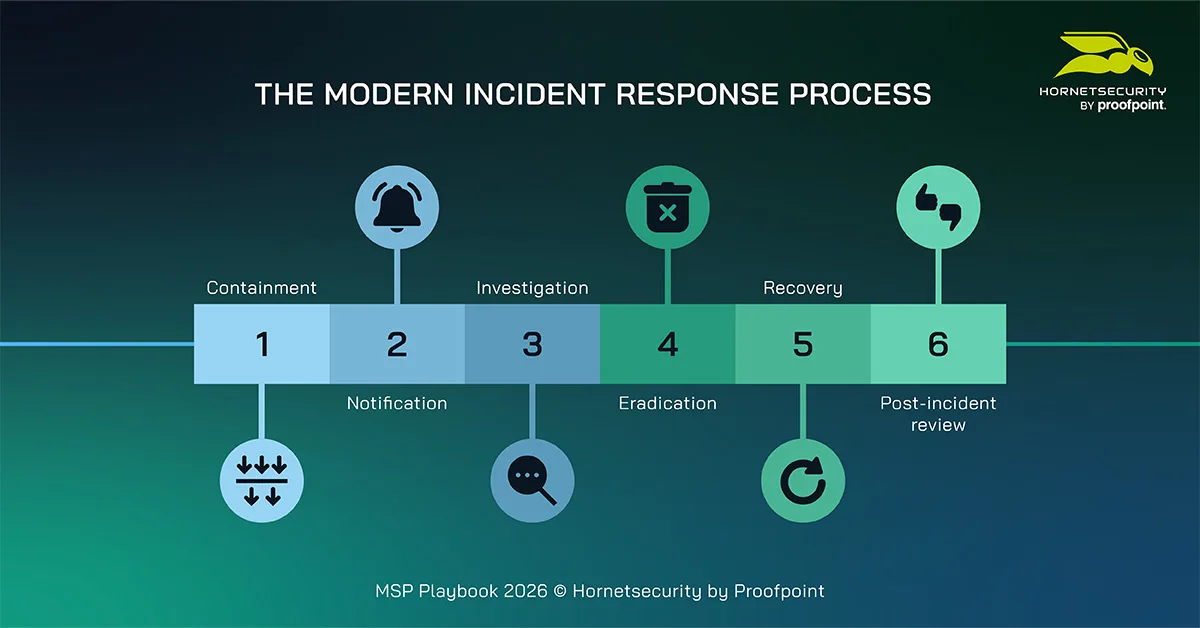
365 Multi-Tenant Manager assists MSPs in streamlining and centralizing the management of Microsoft 365 tenants for their customers.
It offers features such as automatic tenant discovery and onboarding via the Microsoft Partner Center connection, reusable settings and policy templates, compliance monitoring, visibility for identities and groups, daily user and group actions, and bulk operations that minimize manual workload.
Vendor consolidation without losing client-specific flexibility
The best approach is consolidation with flexibility. Hornetsecurity can assist MSPs in streamlining essential Microsoft 365 security and management services while still accommodating the unique aspects that are important in various customer settings.
This is the equilibrium that most MSPs require: sufficiently standardized for scalability yet adaptable enough to meet the needs of actual clients.
Discover practical guidance with our playbook
Vendor management is easier when you have a clear operating model. Download the Hornetsecurity MSP Playbook 2026 for practical guidance across onboarding, maintenance, cybersecurity, vendor management, and GenAI.

The MSP Playbook 2026
The MSP Playbook provides MSPs with practical strategies for operating more efficiently across several business areas and remaining competitive in our rapidly evolving industry.
Enhance your MSP operations with one platform
If your team wants to reduce tool overload and improve how you deliver Microsoft 365 services, consider using Hornetsecurity 365 Multi-Tenant Manager. This solution helps MSPs manage multiple customers from one platform. It improves visibility and standardizes operations for better efficiency.

Conclusion: Improve MSP Vendor Management Through Standardization
Good vendor management is essential for MSPs to offer secure and profitable services. MSPs need more than just separate tools; they need a clear plan for managing vendors. This plan should improve visibility in Microsoft 365, make operations more efficient, and encourage better conversations with customers.
The main point is to look at the current stack with clear eyes. Keep what improves outcomes, remove what adds friction, and standardize where doing so makes the service stronger.

Cybersecurity Report 2026
The AI-Driven Acceleration of Global Threats
FAQ
What is the ‘integration tax’ in the context of MSP vendor management?
When companies try to blend tools that weren’t built to work together, they frequently run into unforeseen costs. These can appear as unbillable tasks, extensive reporting needs, manual corrections, and overburdened technicians. In the end, this scenario obstructs the company’s ability to grow both effectively and efficiently.
How does cybersecurity vendor management impact overall risk management?
Cybersecurity vendor management is crucial because every vendor addresses vital components such as identities, data, alerts, and client trust. A practical approach involves identifying critical vendors, assessing their effects on service and security risk, closely monitoring changes, and proactively mitigating potential gaps, all of which enhance overall risk management for MSPs.
What are the 3 steps MSPs should take for effective vendor management?
Step 1: Inventory the current stack to understand existing tools and their purposes.
Step 2: Identify redundancy and risk by looking for overlapping capabilities or unclear ownership.
Step 3: Standardize practices where it genuinely improves service delivery without forcing a one-size-fits-all approach, allowing for customization where necessary.