

What is Azure Bastion?
In this post, you’ll get a short introduction to Azure Bastion Host. To be honest, I still don’t know if I should pronounce it as [basˈti̯oːn] (German), /bæstʃən/ (US engl.) or [basˈt̪jõn] (french) but that shouldn’t stop us from learning more about Azure Bastion Host, what is it, and when it’s useful.
So let’s start.
Table of Contents
What is a bastion host?
In general, a cloud bastion host is a special-purpose host that provides connectivity to internal servers in cloud networks without exposing these internal servers to the Internet with public addresses. Bastion hosts can be configured in such a way they act as “jump boxes” for certain types of traffic, including SSH and RDP.
What is Azure Bastion Host?
Azure Bastion Host is a Jump-server as a Service within an Azure vNet. What does that mean exactly? Well, a jump server is a fixed point on a network that is the sole place for you to remote in, get to other servers and services, and manage the environment through bastion in Azure. Now some will say, but I build my own jump server VM myself! While you’re certainly free to do that yourself, there are some key differences between the self-built VM option and the Azure Bastion service.
A regular Jump-server VM must either be reachable via VPN or needs to have a public IP with RDP and/or SSH open to the Internet. Option one, in some environments, is rather complex. Option two is a security nightmare. With Azure Bastion Host, you can solve this access issue. The Azure Bastion service enables you to use RDP and SSH via the Internet or (if available) via a VPN using the Azure Portal. The VM does not need a public IP, which GREATLY increases security for the target machine.
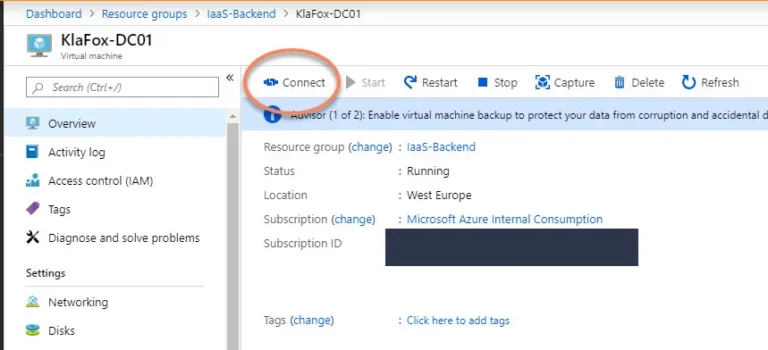
After the deployment (which we’ll talk about in a second), the Azure Bastion host becomes the 3rd option when connecting to a VM through the Azure Portal, as shown below.
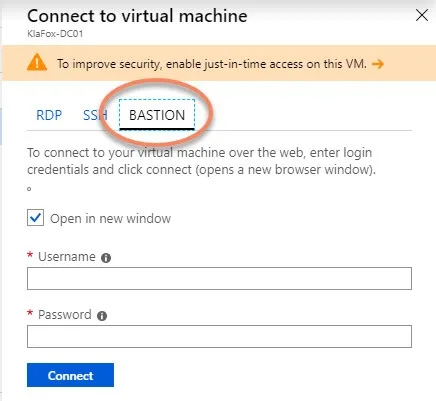
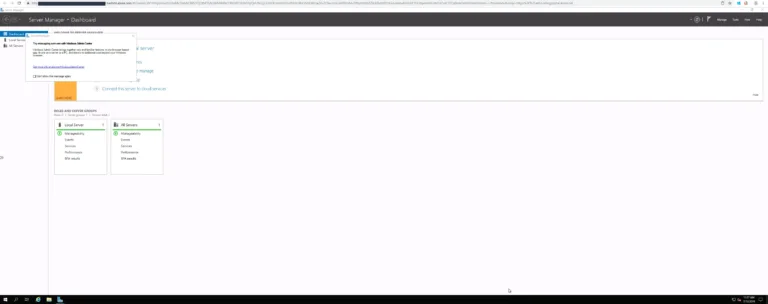
After you hit connect, a HTTPs browser Window will open and your session will open within an SSL encrypted Window.
Azure Bastion Use Cases
Now let’s list some possible use-cases. Azure Bastion can be very useful (but not limited) to these scenarios:
- Your Azure-based VMs are running in a subscription where you’re unable to connect via VPN, and for security reasons, you cannot set up a dedicated Jump-host within that vNet.
- The usage of a Jump-host or Terminal Server in Azure would be more cost-intensive than using a Bastion Host within the VNet (e.g. when you have more than one admin or user working on the host at the same time.)
- You want to give developers access to a single VM without giving them access to additional services like a VPN or other things running within the VNet.
- You want to implement Just in Time (JIT) Administration in Azure. You can deploy and enable Bastion Host on the fly and as you need it. This allows you to implement it as part of your Operating System Runbook when you need to maintain the OS of an Azure-based VM. The Azure Bastion host allows you to do this without setting up permanent access to the VM.
How to deploy Azure Bastion to protect VM environments
The way you deploy Azure Bastion Host within a VNet is pretty straightforward. Let’s go through the Azure Bastion setup steps together.
- Open the Azure Preview Portal through the following link.
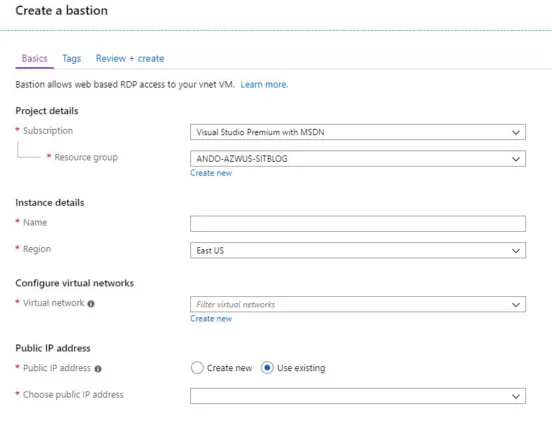
- Search for the feature in the Azure Marketplace and walk through the deployment wizard by filling out the fields shown below.
Again, the Bastion host Azure deployment is quite simple and most options are fairly well explained within the UI. However, if you want further details, you can find them in the official feature documentation here.
Also, be aware that a Bastion Host must be implemented in every vNet where you want to connect to a VM. Currently, Bastion does not support vNet Peering.
How Much Does Azure Bastion Cost?
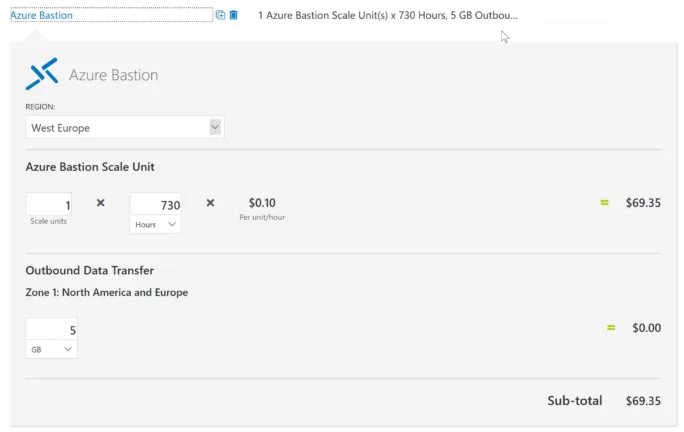
Pricing for Bastion is pretty easy to understand. As with all Microsoft VM Services, you pay for the time the Bastion host is deployed and for any Bastion service you have deployed. You can easily calculate the costs for the Bastions Hosts you need via Azure Price Calculator.
I made my example for one Bastion Host in West Europe, with the assumption it would be needed all month long.
Bastion Roadmap Items
Being in preview there are still a number of things that Microsoft is adding to Bastion’s feature set. This includes things like:
- Single-Sign-On with Azure AD
- Multi-Factor Auth
A much-requested feature, the ability to have a single Bastion and still manage VMs in peered VNets is now available.
You can see additional feature requests or submit your own via the Microsoft Feedback Forum.
If you like a feature request or want to push your own request, keep an eye on the votes. The more votes a piece of feedback has, the more likely Microsoft will work on the feature.
Additional Documentation and Wrap-Up
Additional documentation can be found on the Azure Bastion Sales Page.
Conclusion
Finally, I’d like to wrap up by finding out what you think of Azure Bastion. Do you think Azure Bastion is a worthy feature? Is this something that you’ll be putting into production once the feature is out of preview? Any issues you currently see with it today?
Thanks for reading!
FAQ
Is Azure Bastion free?
The Azure Bastion service is free to try, but is a pay-as-you-go service that follows the typical cloud “as-a-Service” pricing structure. Azure Bastion Basic is $0.19 per hour and Azure Bastion Standard is $0.29 per hour.
How do you use Azure Bastion?
Azure Bastion is an Azure Platform service you provision in your Azure vNet allowing connectivity to all internal servers and preventing the need to expose dangerous ports such as RDP and SSH to the Internet. After provisioning the service, you can then use the Azure Bastion host to connect to the internal virtual machine resources.
How does Azure Bastion host work?
The Azure Bastion platform service “plugs into” the internal Azure vNets and allows admins to effectively remove public IP addresses from internal VMs. This Azure Bastion architecture allows connections through the Bastion host and to the internal Azure virtual machines. Azure Bastion limitations include you must be logged into the Azure portal to connect using the Azure Bastion host.
What is Bastion in cloud?
Bastion in the cloud provides restricted connectivity and often provides just-in-time access to target resources that don’t have public endpoints
How do I connect to Azure VM with Bastion?
The Azure Bastion service allows Azure portal users to connect to internal virtual machines without the need to expose the internal virtual machine publicly. Once you provision the Azure Bastion host, Bastion is available under the Connect option for the virtual machine.
How long does Azure Bastion take to deploy?
Azure Bastion only takes a few minutes to deploy and requires a special-purpose subnet with the name AzureBastionSubnet.