

EvilTokens Device Code Phishing: How It Works and How to Stop It
EvilTokens is a criminal phishing-as-a-service platform which tricks people into thinking they are logging into a real Microsoft website. In reality, this scam allows attackers to take over victims’ Microsoft 365 accounts. This service started in 2026 and makes it easier for scammers to target Microsoft 365 users. It does this by sending customized messages and generating fake login codes while also automating their actions once they gain access to accounts.
On September 22, 2026, Microsoft and law enforcement shut down the EvilTokens operation, but there are other similar services that can be used to trick people into giving away their account information.
Table of Contents
Key Takeaways
- A legitimate microsoft.com sign-in page does not prove the sign-in request itself is legitimate.
- EvilTokens does not need to steal a password if the victim authorizes the attacker’s device-code session.
- MFA still matters, but the victim can complete it as part of the attacker-initiated flow; controls on the flow itself are therefore essential.
- Defenders should correlate email, identity, device-registration, Microsoft Graph, and mailbox-rule signals rather than rely on a single indicator.
- Microsoft disrupted EvilTokens infrastructure in September 2026, not the broader device code phishing technique.
What Is EvilTokens?
EvilTokens is a platform that provides phishing services, allowing people to easily compromise Microsoft 365 accounts. This service launched in February 2026 and has been used to target organizations around the world. According to Microsoft, a group known as Storm-2992 is responsible for creating and maintaining EvilTokens. So far, this platform has led to the compromise of over 12,000 email accounts in more than 10,000 businesses globally.
Microsoft’s September 2026 analysis describes AI-assisted lure creation, automated infrastructure, token management, inbox analysis, and Microsoft Graph reconnaissance.
The significance of EvilTokens lies in the fact that it did more than create fake websites to deceive users. It made it easier for scammers to go from sending deceptive emails to gaining access to real online accounts, and then even infiltrating business email systems.
Microsoft explains that after the scammers gained access, they used advanced technology to help them understand and translate messages, pinpoint discussions about money, recognize trusted connections, and find chances to commit fraud.
What Is Device Code Phishing?
Device code phishing takes advantage of a legitimate OAuth authentication process designed for devices that cannot easily support a standard interactive sign-in, such as shared displays or conferencing devices. In this process, the device displays a short code. The user then opens a browser on a different device with a normal keyboard, enters that code, and completes the authentication.
In the malicious version, the attacker initiates the device-code flow and persuades the victim to enter the attacker’s code at Microsoft’s legitimate device sign-in page. Once the victim approves the request, Microsoft issues tokens to the session that initiated the flow—the attacker’s session.
The browser domain can therefore be genuine while the authorization context is malicious. Microsoft classifies device code flow as a higher-risk authentication flow and recommends blocking it wherever possible.
How Does EvilTokens Device Code Phishing Work? The Attack Phase by Phase
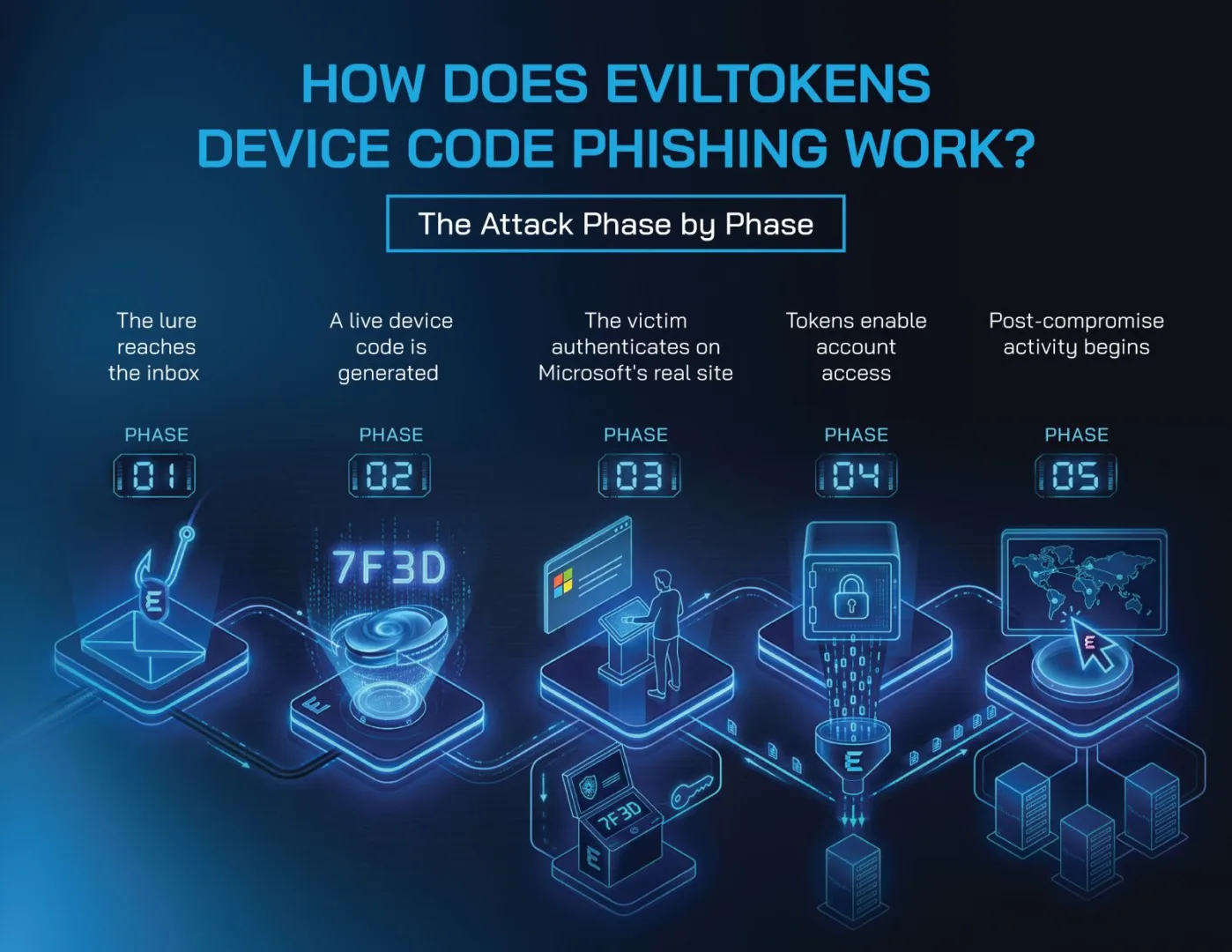
Phase 1 — The lure reaches the inbox
The attack starts with a message designed to create a plausible reason to open a link or attachment. Microsoft observed themes including invoices, requests for proposals, shared files, password-expiry notices, document-signing services, voicemail, and other role-specific business workflows. Payloads included malicious URLs, PDFs, and HTML files.
The practical control at this stage is layered email security: anti-phishing and impersonation controls, link analysis, attachment inspection, and user reporting.
Phase 2 — A live device code is generated
When the victim reaches the attacker-controlled page, the backend can request a fresh device code from Microsoft in real time. This dynamic generation solves a limitation of older device-code attacks: the code’s short lifetime starts when the victim engages, rather than when the phishing email is sent.
Microsoft’s April 2026 campaign analysis describes short-lived polling infrastructure and automation used end to end.
Phase 3 — The victim authenticates on Microsoft’s real site
The phishing page presents the code and sends the victim to microsoft.com/devicelogin. The victim pastes the code and completes normal authentication; if the account requires MFA, the victim may also complete that MFA step. Meanwhile, the attacker’s backend polls for authorization.
Once the user confirms the request, the attacker-controlled session receives the resulting access.
Phase 4 — Tokens enable account access
The attack focuses on token and session authorization rather than just harvesting passwords. Valid access and refresh tokens allow users to access the services that their session permits and maintain that access as long as the tokens remain valid. This is why simply resetting a password may not be enough after a suspected compromise.
Defenders also need to revoke sessions and investigate any potential persistence of the threat.
Phase 5 — Post-compromise activity begins
Once attackers gain access, they can read or steal emails, create inbox rules to hide or redirect messages, and use Microsoft Graph for spying. Sometimes, they register devices to stay connected for a long time. EvilTokens also offers AI tools to analyze mailboxes. This helps identify payment processes, financial discussions, internal relationships, and important people.
To protect against these threats, treat suspicious device code authentication as the start of an incident, not just the end of a phishing situation.
Does EvilTokens Bypass MFA?
Not in the simple sense of technically defeating the second factor. In a successful device code phishing attack, the victim can be socially engineered into completing the legitimate Microsoft authentication process—including MFA—for an attacker-initiated device-code session. The attacker benefits from the authorization that the victim just approved.
Using MFA is very important, but it’s not the only way to keep our information safe. We need to reduce risky logins and use methods that are harder for phishing attacks to trick.
We should keep an eye out for any unusual login attempts. Everyone must be cautious about unexpected requests for device codes, even if they appear to come from trusted Microsoft websites. If you believe you have received a suspicious request, the first step is to contact your security team.
Once you’ve analyzed your logs and established if there are any legitimate processes in your organization that rely on device code flow (look closely at your developers if you have them, they often use it) you should implement Conditional Access policies to block it for everyone else. For full details, read Microsoft’s guidance on blocking authentication flows.
What Happens After a Microsoft 365 Account Is Compromised?
The main goal here is to use access to email accounts to gain useful information to commit fraud. Attackers can look through emails for things like invoices, bank information, approval processes, messages from executives, supplier details, and current transactions.
They might pretend to be the person whose account they hacked, or they could take advantage of trusted relationships to trick others.
Businesses can face serious risks if they’re not careful. They might receive fake requests for payments, put important information at risk, accidentally change their email settings in harmful ways, or even open themselves up to more attacks on other accounts.
To help prevent financial fraud, Microsoft’s Digital Crimes Unit suggests that it’s important to double-check any changes to payment details, money transfers, or unexpected approvals by using a trustworthy method, separate from the original request.
How Can Organizations Detect EvilTokens?
To spot potentially harmful tokens, pay attention to the activities that happen around the login process instead of just looking at familiar website addresses. Here are some warning signs to look out for:
- Strange device logins that use a special code.
- Unexpected changes in user permissions after a device login.
- Unusual registrations of devices in the system.
- Unusual activity involving Microsoft services.
- Suspicious changes to email settings.
Microsoft Defender XDR and Entra Identity Protection include detections for several of these behaviors. In Entra sign-in logs, defenders can also use Authentication protocol = Device code flow to find direct use and “Original transfer method = Device code flow” to identify sessions that originated from device code flow even when a later event does not show it as the current protocol.
Correlation is crucial. A suspicious click on an email, followed by device code authentication, new device registration, Graph reconnaissance, and mailbox changes is much more significant when considered as a sequence than any of these signals on their own. Develop detection methods and investigation playbooks based on this chain of events.
How Can Organizations Protect Microsoft 365 Accounts Against EvilTokens?
Protection should break the attack at multiple points:
- reduce delivery of the lure;
- restrict unnecessary device-code authentication;
- make unusual authorization easier to recognize; and
- contain compromised sessions quickly.
Restrict device code flow where the business does not need it
Microsoft recommends getting as close as possible to a unilateral block on device code flow. Start by auditing existing use, then use Conditional Access to block the flow for users and resources that do not need it. If legitimate Teams devices require device code flow, create tightly scoped exception groups and follow Microsoft’s current guidance rather than broadly excluding users or applications. Test in report-only mode before enforcement.
Strengthen phishing and email defenses
To strengthen the phishing and email defenses, we need to enhance the security of initial lures by implementing sender verification, detecting impersonation attempts, scanning for malicious links, analyzing attachments, and establishing post-delivery responses.
365 Total Protection by Hornetsecurity can strengthen the Microsoft 365 email security layer around phishing and account-compromise risk, with capabilities that include spam and malware filtering, advanced threat protection, and security awareness options depending on plan.
This is a complementary control, not a replacement for Entra ID identity policy. Advanced Threat Protection can add protection against sophisticated email threats, while Security Awareness Service can reinforce the user behaviors that matter when a phishing flow deliberately hands the victim off to a legitimate Microsoft page.
Train users for the device-code-specific warning sign
Here’s a simple guideline to follow: Don’t approve any sign-in requests for a device unless you are sure you initiated it, even if it says it’s from microsoft.com. If you receive a request to sign in, ask yourself a few questions: Who sent the request? What device or app are you being asked to allow? Did you expect to log in right now? Just because the website looks legitimate doesn’t mean the request is safe. Always check before you click!
Prepare the account-compromise response
If you believe an account has been compromised, it’s crucial to respond promptly. Follow the most recent guidelines from Microsoft for dealing with such issues:
- If you’re an end user, alert your IT / cybersecurity team immediately.
- Begin by blocking any active sign-in sessions and revoking refresh tokens.
- You might also consider temporarily disabling the account if you need to act swiftly.
- Remember that simply revoking a session may not instantly terminate all access, as some tokens can stay valid for up to an hour.
- Examine the inbox along with transport rules, Entra device enrollments, OAuth and session activities, Microsoft Graph interactions, recently accessed emails, and communications that may have been compromised.
- Changing the password is beneficial if credentials might also be endangered, but it shouldn’t be seen as the sole solution to token-based breaches.
If the situation is urgent, it’s advisable to take more decisive actions.
Has EvilTokens Been Taken Down — and Is It Still a Threat?
Microsoft announced a coordinated disruption of EvilTokens infrastructure on September 22, 2026. Microsoft’s Digital Crimes Unit says Microsoft and partners seized 50 websites used to operate the service and disabled more than 150 additional domains tied to supporting infrastructure; UK law enforcement also arrested two men on suspicion of offenses connected with the alleged operation.
That action materially affected the platform, but it should not be interpreted as the end of device code phishing. The technique is based on abuse of a legitimate authentication flow and is not unique to one Phishing as a Service (PhaaS) provider. Durable defenses should therefore target the authentication pattern, risky session behavior, and post-compromise actions—not only known EvilTokens domains or infrastructure.

Modern phishing can abuse trusted services as well as fake ones. Explore 365 Total Protection for Microsoft 365 to strengthen email security and resilience layers around Microsoft 365, while continuing to enforce identity-side controls such as Conditional Access in Entra ID.
Conclusion: Treat Authentication Context as Part of Phishing Defense
EvilTokens is a useful reminder that “check the URL” is no longer sufficient phishing guidance. A real Microsoft page can be the final step in a malicious authorization flow when the attacker initiated the device-code session.
We at Hornetsecurity believe MFA is vital to keeping our accounts protected. However, it is only one part of our security plan. We also need Conditional Access to control who can see certain information. We must also secure our email to block harmful messages and regularly check our identities and email accounts for unusual activity. We also need to monitor the devices we use.
Our goal is to lower the risk of falling victim to phishing attempts and limit what attackers can do if they get past our authentication.
Cybersecurity Report 2026
The AI-Driven Acceleration of Global Threats