
Why Backing Up Entra ID is Critical for Every IT Admin
As the foundational backbone of identity and access management for Microsoft 365, Microsoft Entra ID is critical for almost everything we do in Microsoft 365. Like email, SharePoint, and Teams data, identity data must be backed up – without Entra ID, these services simply wouldn’t function.
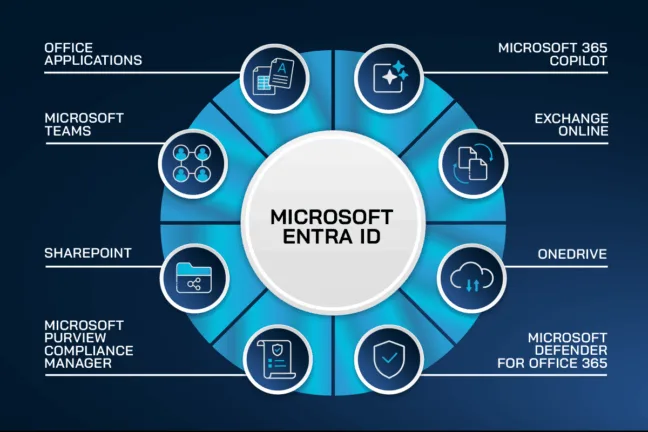
If you drew a massive Venn diagram with all the Microsoft 365 Services, right in the middle of that diagram would be Microsoft Entra ID.
Strange then how few organizations seem to include identity in their recovery strategy, evidenced in the Strata 2025 State of Multi Cloud Identity Survey, who found that:
Despite deploying a range of strategies to ensure IAM resilience, the majority of organizations remain unprepared for the full spectrum of identity-related challenges.
This blog explores why backup of Entra ID is now a critical requirement for IT admins. It also addresses Microsoft 365 partners and what can go wrong without it. Furthermore, it explains how 365 Total Backup by Hornetsecurity solves this growing risk. This solution is effective when combined with your broader Microsoft 365 backup strategy.
The Risks Are Real
No matter how much effort, time and dollars are invested in security tools, the “human factor” is the common weakness that’s most difficult to measure and manage. Bad actors know this too, of course.
They use tried and tested identity-related social engineering techniques, and with bit of luck, hook a privileged user and take advantage of these human security gaps when they are:

Cybersecurity Report 2026
The AI-Driven Acceleration of Global Threats
Email skimming
Only briefly glancing at emails while wading through many, overlooking key messages and potentially unauthorized changes.
Rushing
Overly focused on completing a change correctly due to work overload, leading to a loss of routine vigilance and performing misconfigurations.
The Hidden Risk of Ignoring Entra ID Backup
When was the last time you saw a headline discussing the importance of an Entra ID backup or recovery? Like many Azure Cloud Professionals, you probably just assumed Microsoft does that for you. The reality is unfortunately quite different.
Although improving, Entra ID’s recovery capabilities are limited and somewhat inconsistent, thus making it vital to include in your overall backup strategy.
Data loss
Object deletion is instant, with restoration available only within 30 days to limited types – more on that later. Unnoticed, a critical component such as App Registrations may be lost for good.
Misconfigurations
Delegated Administration is a common practice and a good tool for improving operational efficiency. If these privileges are not properly locked down however, delegated users may delete more than they should or had intended to.
Attacks on Entra ID
Entra ID is a juicy target for attackers. The amount of damage a bad actor can do once gaining privileged access is significant, and as established – has limited recovery options. A Microsoft blog from October 2025 reported that in the first half of that year identity-based attacks surged by a staggering 32%.
This subject is soon likely to cross the desk of senior leaders, and in fact we’ve already seen how emerging AI-driven threats a significant concern for CISOs is – threat actors’ tactics and techniques are constantly evolving and taking advantage of attack vectors.
We can expect those identity-based attacks to only increase against Entra ID.
Partners and customers often overlook Entra ID in their backup scope
Many managed service providers and internal IT teams focus heavily on data backup but less so on the identity configuration. This gap usually isn’t discovered until something goes wrong – and as the story tends to go, by then recovery options are extremely limited.
What might cause a data breach
Accidental changes
Mistakenly deleting a rarely used Conditional Access Policy (your policies are all documented, right?) can have serious implications, not least of which is introducing weaknesses in your security controls.
I don’t think it would be difficult to find a case where an over-zealous and well meaning (but overly-privileged – yes that does happen!) admin makes an error. We need to look no further than the GitLab production database outage on January 31, 2017, where an engineer mistakenly deleted the primary database directory while attempting to fix replication on what they believed was a secondary server. That would have been a bad day at the office.
We see this too in IBM’s annual “data breach report” in 2024 and 2025 which includes the percentage of data breaches specifically caused by human error over the past two years, showing a surprising increase.

Source: IBM data breach report 2024 & IBM data breach report 2025
Malicious modifications
If attackers compromise an account with elevated privileges, they can silently alter roles, delete groups, or modify authentication methods – leaving no easy way to revert.
Locked-out admins
Despite the clear warning displayed when managing Conditional Access Policies, a few incorrect changes to a policy, and you could find one or more admins locked out, or worse, large parts of the organization.
Impact on business continuity and security posture
Security Teams may be left with newly introduced security blind spots and potentially loss of key material needed for forensic investigations. While automated security notifications improve visibility of identity changes and quicker response times, once it’s gone, it’s gone.
An event, whether malicious or simple negligence rendering part of Entra ID inaccessible can result in business disruptions such as:
- User downtime
- Costs from operational delays
- Unable to meet contractual SLAs or regulatory compliance requirements
These incidents can quickly blow out, and it will be your finely tuned SOC doing the heavy lifting on top of their usual workload.
Common Entra ID Pain Points for IT Admins
No ability to roll back after a mistake
Microsoft only recently announced the public preview of a new recovery option for Conditional Access Policies, although the 30-day clock starts ticking immediately once soft-deleted.
Downtime and disruption for users, groups, or entire organizations
Because Entra ID is hooked into authentication flows, group-based licensing and even access to cloud applications, misconfiguration or object deletions – intentional or malicious – can have widespread implications. Stop for a moment to consider how it would be if your Microsoft Teams platform was unavailable!
This might be a good time to review your Microsoft Teams security settings and ensure your system and service configuration documents are up to date.
Struggles with forensic investigation, tracking object state over time and incident response
The Entra ID platform doesn’t support versioning by design. There are no “deltas” of the configuration where you can review the states of different objects over time. You have limited options therefore for forensic investigations, critically important during incident response.
While the event logs can show you who did what and when, you’ll be relying on complete and current documentation.
How 365 Total Backup Solves These Challenges
New Entra ID backup scope
Hornetsecurity’s 365 Total Backup has been expanded to include Entra ID protection, initially covering users and groups.
Your auditors will be pleased too, making it easier to retain compliance with regulations such as GDPR, and security frameworks like ISO27001.
For customers already protected with 365 Total Protection Plan 3 from Hornetsecurity, you’re well positioned to get started.
Easy restore and re-creation of deleted or misconfigured data
When mistakes happen – and they always do – be it a misconfiguration or deletion, 365 Total Backup enables admins to easily and efficiently restore deleted or modified configurations related to IT admin or any User or Group. Objects are re-created back into Entra ID along with the respective metadata and relationships.
This ensures a fast recovery with minimal downtime, helping maintain operation and service continuity.
Integration into the existing 365 Total Backup dashboard and onboarding flow
Entra ID Backup is seamlessly integrated into the 365 Total Backup ecosystem, enabling IT Admins to manage identity backups from the same dashboard using familiar onboarding and management workflows.
Entra ID objects are monitored in the dashboard alongside email, Teams, SharePoint, and OneDrive, providing a unified backup experience for all Microsoft 365 data. This reduces training time, simplifies operations, and delivers a consistent user experience.
Protect Your Microsoft 365 with 365 Total Backup
Don’t let accidental misconfigurations or malicious attacks put your Microsoft 365 environment at risk. Your Microsoft Entra ID holds the keys to your entire M365 ecosystem and losing access to Users, Groups, Devices, or Conditional Access policies can bring operations to a halt.

When you choose 365 Total Backup by Hornetsecurity, you can count on the following benefits:
- Comprehensive protection: Safeguard not only files and mailboxes, but also Microsoft Entra ID configurations.
- Business continuity: Ensure fast and reliable recovery when it matters most.
- Beyond data backup: Protect your entire Microsoft 365 environment to keep your organization running smoothly.
Schedule your personalized demo today and see how simple, secure, and powerful protection can be.
Conclusion
Organizations using Microsoft 365 must regularly review how they ensure Entra ID recovery remains available. The heavy reliance on modern cloud services means that identity is front and center. Despite this, many IT teams still lack a reliable method to back up or restore Entra ID configuration data.
The reality is that we live in a time where organizations are expected to perform with a slim workforce yet do as much, if not more. All of this creates real risks of data loss. These risks arise both from human error and attackers. That’s why having an Entra ID backup is essential for your business continuity strategy.
FAQ
Why is backing up Microsoft Entra ID critical for IT admins?
Backing up Microsoft Entra ID is vital because it serves as the foundational backbone of identity and access management for Microsoft 365. Without Entra ID, services such as email, SharePoint, and Teams cannot function effectively. Many organizations overlook identity in their recovery strategy, which can lead to significant risks, including data loss, misconfigurations, and vulnerability to identity-based attacks.
What are the risks of not backing up Entra ID?
– Instant data loss from object deletion can make critical components unrecoverable after 30 days.
– Misconfigurations may occur if overly privileged users accidentally delete essential policies or settings.
– Entra ID is a target for attackers who can exploit compromised accounts for damaging alterations.
– Lack of backup can result in business disruptions, user downtime, and failure to meet compliance requirements.
How does 365 Total Backup address the challenges of Entra ID backup?
365 Total Backup by Hornetsecurity offers robust Entra ID protection, covering users, apps, groups, and access policies. It allows IT admins to quickly restore deleted or misconfigured data, minimizing downtime. With Entra ID backup integrated into the 365 Total Backup dashboard, management of all Microsoft 365 data becomes seamless, simplifying operations and reducing admin training time, which enhances business continuity and security.