

How the Booking Phishing Campaign Works and What Defenders Should Watch For
This article examines a Booking phishing campaign that uses fake CAPTCHA pages, clipboard injection, and PowerShell abuse to deliver PureHVNC malware.
The phishing attack begins with a persuasive cancellation email from Booking.com that features recognizable branding and reassuring language. Victims are then instructed through several verification steps that pressure them into performing a dangerous action.
According to our campaign analysis, we identified more than 45K emails in the last week.
Table of Contents
- Anatomy of the Booking phishing email
- What happens after the click
- From social engineering to malware delivery
- Detection clues and defensive takeaways
- How to recognize and avoid booking phishing attacks
- Booking phishing prevention needs user awareness and email protection
- IoCs (Indicators of Compromise)
Anatomy of the Booking phishing email
This approach exploits trust in well-known brands. If users fail to recognize the threat, they risk account compromise or malware infection. The attacker is relying on familiarity before the user has time to slow down.
The hook appears straightforward: a reservation cancellation message that seems to be sent from Booking.com. This is where it boils down to brand impersonation. For hotel staff, travel teams, or anyone managing reservations, it is regarded as “common practice” to open it and follow the instructions. That is exactly the point.
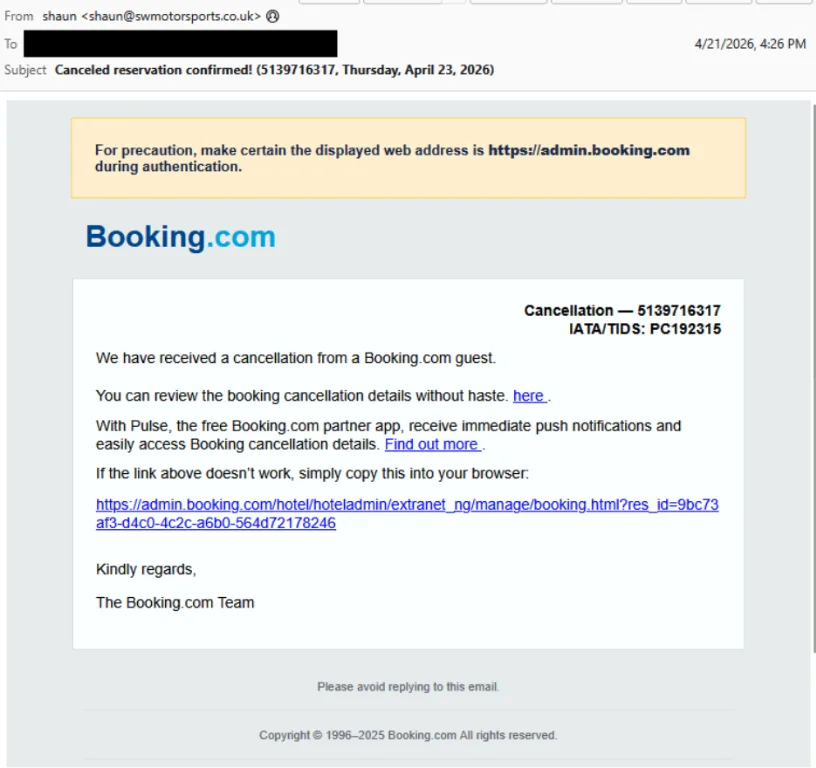
The email uses a subtle social engineering tactic: It tells the recipient to make sure the displayed URL looks legitimate, which sounds reassuring but is really there to lower suspicion. That is one of the clearest signs of a booking phishing scam to watch for: urgency, polished branding, and “helpful” wording wrapped around a mismatched destination.
What happens after the click
The psychological impact of this flow is significant, as it builds an illusion of authenticity.
Fake CAPTCHA stage
After the click, the campaign shifts from email lure to staged interaction. The victim is taken to a fake CAPTCHA page with image selection, then to a CAPTCHA that appears to be real. Although counterintuitive, this added friction increases perceived legitimacy.
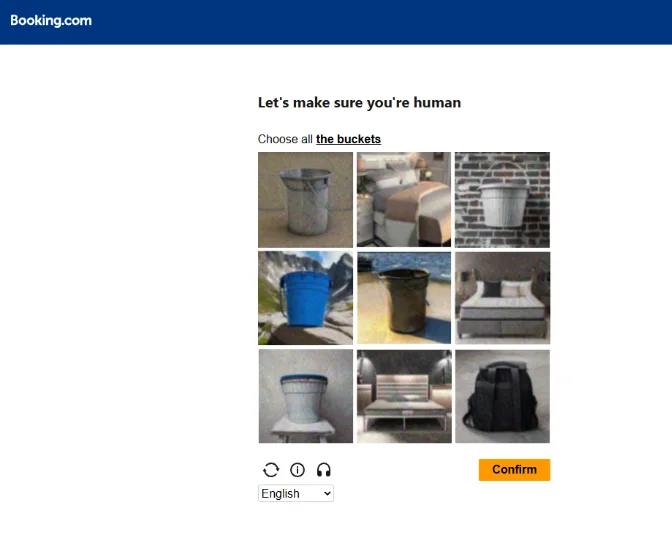
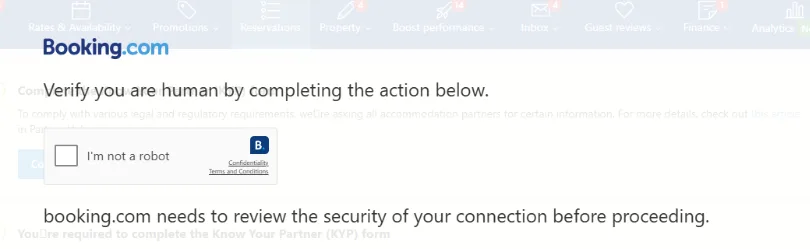
Attackers make harmful steps look routine by wrapping them in familiar verification processes.
Clipboard injection
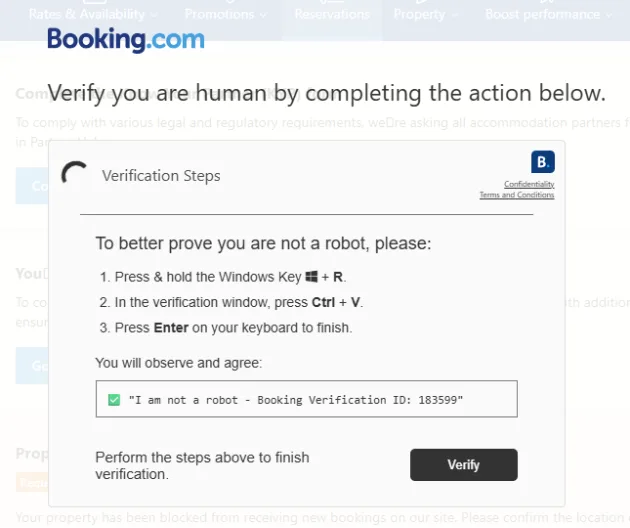
Next, the user encounters a “verification” prompt, while a harmful PowerShell command gets copied to the clipboard, known as ClickFix technique (or Pastejacking technique). They’re then encouraged to open Windows Command Prompt and paste it there.
From social engineering to malware delivery
Once executed, the command retrieves remote content, downloads and unpacks a payload, and ultimately leads to PureHVNC delivery.
PureHVNC is a remote access trojan, so this is not just about a stolen password or a nuisance pop-up. It is about foothold, persistence, and control.
The campaign analysis reveals the following behaviour:
- it reviews environment and antivirus checks;
- automatic program startups from the registry;
- files placed in user folders;
- and communication with external servers.
The main goal of the trojan is sustained access after the first click.
This emphasizes the need for a comprehensive security approach that includes both technology and personnel training.
Detection clues and defensive takeaways
For booking phishing campaign detection, you need to be aware of the following:
- malicious sender addresses;
- suspicious URLs in the email body;
- downloader infrastructure;
- PureHVNC C2 indicators.
These details matter because they point to a broader trend that defenders need to keep an eye on, rather than focusing solely on a single message.
That pattern includes impersonation emails built around reservation language, websites that ask for odd verification steps, prompts that tell users to paste commands into Command Prompt, PowerShell abuse, and payload staging from unfamiliar domains.
MalwareBazaar also indicates booking.com-themed malware tagging dating back to 2023, with related booking-themed samples still appearing in 2025, reinforcing that this lure theme has staying power.
How to recognize and avoid booking phishing attacks
In order to be able to identify booking phishing before it turns into a compromise, start with double-checking the basics:
- do not trust branding alone
- do not paste commands into Command Prompt from a web page, no matter how official the prompt looks
- just because a site has CAPTCHA screens doesn’t mean it’s safe
- verify cancellation notices directly in the official Booking platform, not through embedded links
- escalate suspicious messages to IT or security
For defenders, strong email-layer filtering, link analysis, and payload detection help stop phishing websites and malware delivery before a user is pulled into the workflow.
Booking phishing prevention needs user awareness and email protection
Booking phishing prevention is no longer just about spotting a fake logo or a typo-filled email. Campaigns like this one combine impersonation, staged verification, and malware delivery to pressure users into doing the attacker’s work.
Hornetsecurity Advanced Threat Protection helps organizations detect malicious emails, links, and payload-delivery attempts earlier, reducing the chance that a convincing Booking-themed message becomes an endpoint compromise.

To strengthen booking fraud protection and protect against booking phishing campaigns before they reach users, schedule a demo and see how Hornetsecurity Advanced Threat Protection fits into your email security stack.
IoCs (Indicators of Compromise)
| Type | Value | Description |
|---|---|---|
| [email protected] | Email address used to send campaign | |
| [email protected] | Email address used to send campaign | |
| IP | 51.182.118.100 | IP address used to send campaign |
| IP | 162.255.87.188 | IP address used to send campaign |
| IP | 212.48.84.192 | IP address used to send campaign |
| URL | https://qdfljwx.com/ | Malicious URL used in email body |
| URL | https://hotel-equatorial.com | Malicious URL used in email body |
| URL | https://spzhucheng.com | Malicious URL used in email body |
| URL | https://xiananhotel.com | Malicious URL used in email body |
| Domain | gskqf.com | Domain reached by PowerShell script |
| URL | https://halfmillion-iq.com/halfmillion-iq.zip | Url hosting malicious payload |
| Hash | db8629568b96354675fb4891490829b0314de94c86200cb653308d9f80b26e10 | Hash of malicious payload / halfmillion-iq.zip |
| Domain | nisuwyyyqsafdas.com | PureHVNC C2 |
| IP | 94.26.90.216 | PureHVNC C2 |