
How Attackers Abuse Legitimate RMM Tools
Key Takeaways
- Attackers may use phishing emails and deceptive document workflows to persuade users to install legitimate RMM software.
- The installation chain may include a disguised executable, MSI package, Windows service, firewall changes, and Safe Mode persistence.
- Security teams should distinguish approved RMM deployments from software installed through unusual email, browser, script, or temporary-directory activity.
- Effective detection combines application allowlisting with telemetry from email, process creation, services, registry changes, firewall rules, and network connections.
- Recurring lures and installation patterns can help cluster related campaigns.
Table of Contents
From Phishing to Remote Control
Threat Intelligence Lab analysts have observed a renewed wave of campaigns that use legitimate remote monitoring and management tools as the final access mechanism.
Remote monitoring and management (RMM) platforms help administrators support computers at scale. They provide remote control, software deployment, system inventory, file transfer, command execution and automated maintenance.
Those capabilities also give attackers a ready-made access channel. Instead of developing a custom backdoor, an operator can persuade a user to install an agent that already supports remote administration. The result may look like an unauthorized IT deployment rather than a conventional malware infection.
During 2026, we observed a renewed wave of campaigns using legitimate RMM products in this way. The lures and installers changed, but the recurring chain remained clear: establish trust in the inbox, obtain user execution, install the RMM agent, change the endpoint and connect to remote-access infrastructure.
A Chase Themed Lure Led to FleetDeck
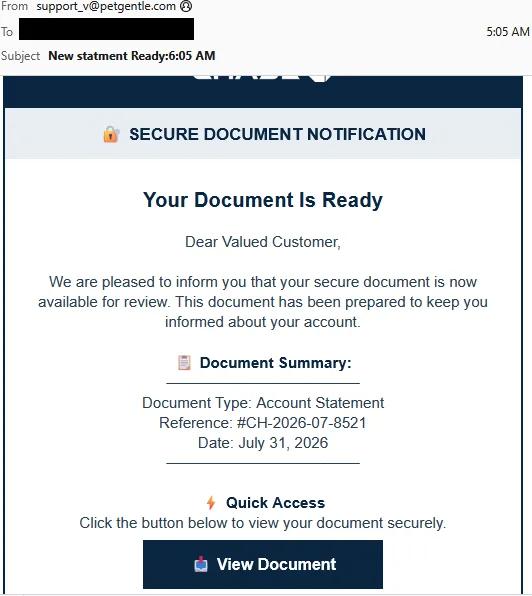
In September 2026, a Chase-themed campaign delivered more than 80,000 messages in a few hours. The email presented a secure account statement and directed recipients to an HTML file hosted through GitHub user-attachments infrastructure. Opening the file downloaded Chase_Statement.Viewer.exe, which then installed FleetDeck on the endpoint.
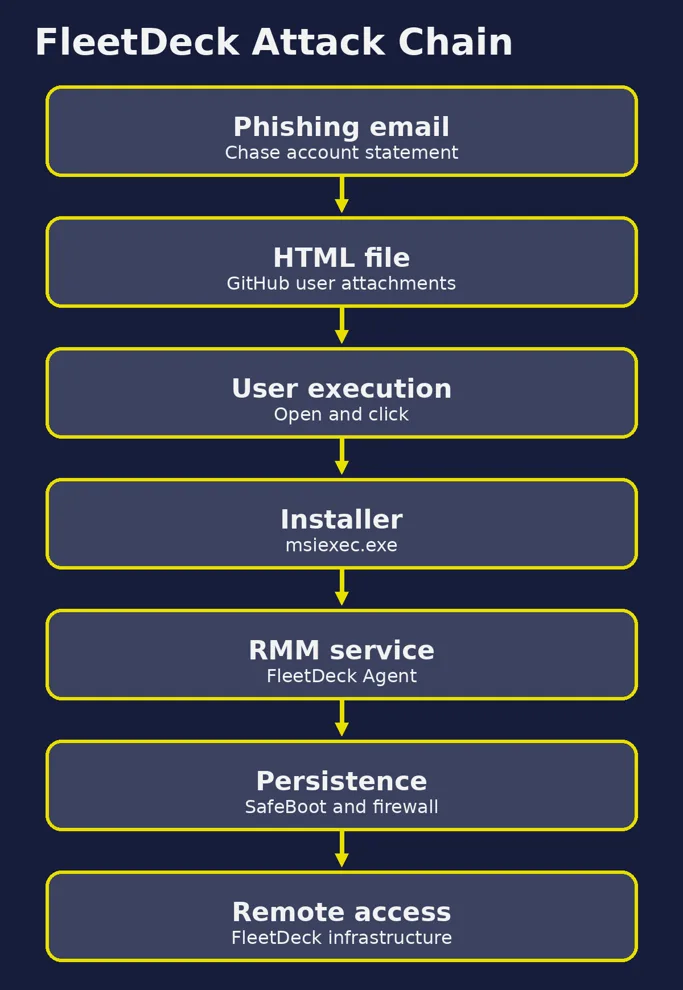
The file name suggested a document viewer. Its behavior told a different story. After execution, the viewer created an MSI package in the user’s temporary directory and invoked msiexec.exe. FleetDeck components were installed under C:\Program Files (x86)\FleetDeck Agent\ and registered as the FleetDeck Agent Service. PowerShell commands created inbound Windows Firewall rules for the service and agent executable. The installation also added the service under the SafeBoot Network registry path, allowing it to operate in Safe Mode with networking.
THE KEY OBSERVATION: The product was legitimate, but the deployment was unauthorized: a trusted brand led to a deceptive document workflow, a viewer executable, a new service and an active remote-access channel.
The FleetDeck Installation Story
Once active, FleetDeck queried the host through PowerShell and WMI. The observed collection included the domain, system status, manufacturer and model, physical memory, operating system and version, BIOS serial number, last boot time, processor, video controller, architecture, network adapter type, MAC address, system language and external IP address. The agent then communicated with legitimate FleetDeck infrastructure.
The Same Chain Spans Several RMM Products
The Chase case is not an isolated example of attackers choosing a remote-access product. Other campaigns used different lures and delivery mechanisms, but followed the same operational logic: persuade the user to execute a document, script or installer, then turn a legitimate administration tool into the final access channel.
ScreenConnect appeared behind government-statement documents, collaboration-platform updates and document-signing lures. SimpleHelp was installed after a dropper profiled the host. An invoice-themed campaign used a ZIP archive and a small batch downloader to request a likely preconfigured MeshAgent and launch a full installation with administrative privileges. Remcos, originally marketed as a legitimate remote-administration tool, was delivered through several archive, script and obfuscation chains.
Our previous analysis describes one of the Remcos attack chains in detail. Read the Remcos RAT attack chain analysis.
The tooling changed, but the operational advantage remained. RMM products bring mature capabilities for persistence, system discovery, remote execution, file transfer and surveillance. They can also communicate with vendor infrastructure that appears legitimate, which makes behavioral context more important than a simple domain blocklist.
| Product | Delivery context |
|---|---|
| ScreenConnect | Government statements, collaboration updates and signing lures |
| SimpleHelp | Social Security themed dropper delivered as a .scr file |
| MeshAgent | Invoice themed ZIP and batch downloader |
| Remcos | Archive, script and obfuscation chains |
Detect the Installation Story
Organizations should maintain an inventory of remote-management software with a legitimate business purpose. For each approved product, document the expected tenant or account, deployment method, support owner and endpoints. Products that are not required for business operations should be restricted through application-control and endpoint-security policies.
Detection should then focus on how the software arrived, what launched it and what changed immediately afterward. Useful combinations include:
- a new RMM agent launched by an email client, browser or script interpreter, or launched from a user-writable temporary directory;
- an installer downloaded into Downloads or Temp and then copied under Program Files;
- a new service associated with an RMM product outside the approved deployment process;
- process chains such as wscript.exe followed by PowerShell and msiexec.exe, or cmd.exe followed by PowerShell and curl.exe;
- inbound firewall rules created by PowerShell soon after a new agent is installed;
- SafeBoot, Run key, Startup-folder or COM changes following an external message interaction.
During incident response, correlate email and web telemetry with process creation, service installation, registry modification, firewall changes and the agent’s first network connections.
The key questions are: who installed the software, when was it installed, which process chain launched it, which account or tenant does it connect to, and is the endpoint supposed to be administered by the organization’s support infrastructure?
Cluster Campaigns Without Overclaiming Attribution
We group recurring campaigns into internal activity clusters using repeated phishing themes, delivery methods, loader behavior, RMM deployment patterns and infrastructure reuse. These clusters describe observed tradecraft. They do not name a threat actor.
RMM software and hosting infrastructure can be reused by unrelated operators, so the evidence in these cases does not support attribution to a named group. The clustering is still useful because it connects apparently separate incidents, highlights repeated delivery behavior and helps analysts recognize when a familiar chain is being used to deploy a different remote-access product.
Conclusion
The Chase campaign demonstrates how quickly a routine phishing lure can become an unauthorized remote-management deployment. In a few steps, an impersonation of a trusted brand led the user to an HTML file, an executable, an MSI installation, a Windows service, persistence changes and an active remote-access channel.
The broader lesson is that the software’s brand is only one part of the investigation. Effective defense combines software allowlisting, controlled RMM deployments and behavioral detection around the installation story. For security teams, the objective is to identify legitimate tools being used outside legitimate workflows, connect individual campaigns through recurring tradecraft and turn those findings into earlier, more confident detection.
Indicators of Compromise
The following indicators relate to the Chase/FleetDeck campaign described in this article.
| Type | Value | Description |
|---|---|---|
| URL | https://github.com/user-attachments/files/31489398/Chase_SecureDocument.html?Voka.com | Malicious URL hosting payload and embed in email – Chase impersonation |
| URL | https://github.com/user-attachments/files/31489398/Chase_SecureDocument.html?Vouka.com | Malicious URL hosting payload and embed in email – Chase impersonation |
| [email protected] | Email address used to send malicious campaign | |
| [email protected] | Email address used to send malicious campaign | |
| IP | 129.159.94.43 | IP address used to send malicious campaign |
| IP | 79.127.222.213 | IP address used to send malicious campaign |
| IP | 23.234.104.111 | IP address used to send malicious campaign |
| SHA256 | 09ccaa4487af73b7f490656e1289acc6f532964498bcaff4cb4b0125384b7093 | Chase_SecureDocument.html / File downloaded when victim click on URL embed in email |
| SHA256 | b3d73d532a9b4786dd17b1d1814e9c4fcbc3841f1b4fed1e92a8793ee4980dd6 | Chase_Statement.Viewer.exe / File downloaded when victim opens the HTML file |
Cybersecurity Report 2026
The AI-Driven Acceleration of Global Threats