

Building Email Resilience After the November Microsoft 365 Outage
On November 12, 2026, a widespread Microsoft 365 disruption affected access to email, with problems continuing into November 13. Users encountered difficulties opening their Outlook mailboxes and delays in email delivery. Functions within other Microsoft 365 services, including Teams and SharePoint, were also affected. Incident timeline
For businesses that depend on email to serve customers, coordinate deliveries, and respond to urgent requests, disruptions like this quickly become an operational problem. Hornetsecurity Email Continuity Service provides an alternative way to send and receive email during a primary mail server outage. Preparing that alternative before it is needed should be part of every organization’s continuity plan.
Table of Contents
What Happened
The disruption affected Exchange Online connectivity and email processing, with consequences extending to features in other Microsoft 365 applications. The impact varied by service and user: some people could not access their mailboxes, while others experienced delays or intermittent functionality. Reported service impact
For an affected business, that can mean more than a temporarily unavailable inbox. A customer may be waiting for an answer, a supplier may need approval, or an employee may be unable to retrieve information needed to complete a task.
An email continuity plan gives employees another route to communicate while their primary platform recovers.
Hornetsecurity Email Continuity Service: An Alternative Route for Email
Hornetsecurity Email Continuity Service gives organizations an alternative email environment when their primary mail server is unavailable. Users can work through a webmail interface, helping them maintain communication with customers, colleagues, and partners during a disruption. Service overview
The service needs to be activated and configured in advance. Effective preparation includes checking which mailboxes are covered, how emergency operation will be managed, and whether users can access the service.
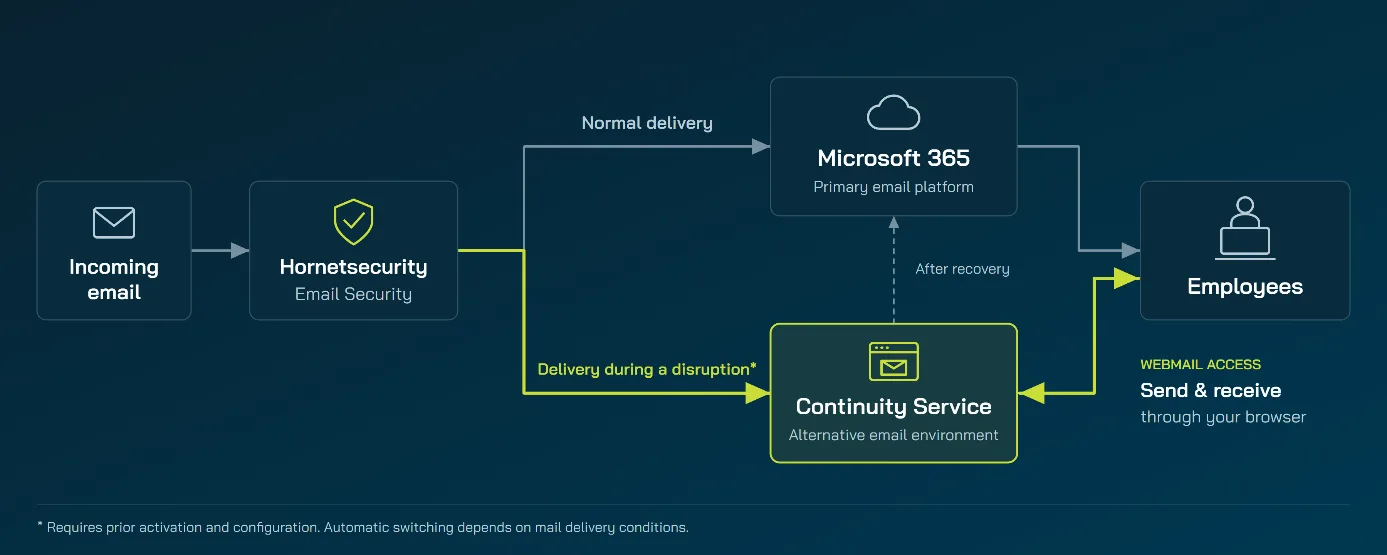
Three Things Matter When Your Primary Email Service Is Unavailable
1. A way for people to access email.
Users need to know where to go and how to sign in. Hornetsecurity provides a dedicated continuity webmail interface. For Microsoft 365- or LDAP-synchronized users, preparation includes an initial Control Panel login and an emergency password. Webmail access requirements
2. A return to normal delivery.
When normal operation resumes, messages remaining in the continuity inbox are automatically delivered to the primary mail server. Messages deleted or moved out of that inbox during emergency operation are not redelivered in the same way. Service operation and message handling
3. A configuration prepared before the incident.
Initial activation can take up to four hours. Emails already delayed before setup is complete are not retrospectively captured by the Email Continuity Service. Activation requirements
Hornetsecurity Email Continuity Service During the November Disruption
Between 12 and 13 November 2026, during the Microsoft 365 incident, Hornetsecurity Email Continuity Service stored copies of incoming emails for organizations that had the service in place. Across that period, we recorded:
- 40k+ customers with Email Continuity Service
- 568k+ mailboxes that received emails through the service
- 2.9m+ emails received and stored in the continuity environment
These figures cover emails received by Email Continuity Service during the incident window. They show the scale of mail the service held as a copy while the primary platform was unstable, not how many people logged in to the webmailer or how many messages they sent. Customers who had activated and configured the service beforehand could use that stored mail and the continuity webmail interface to keep working. Delivery to the primary server resumed automatically once normal operation returned, as described above.
Be Ready for the Next Email Disruption
The November Microsoft 365 outage is a reason to review how your organization would work through an interruption to its primary email service.

Contact your Hornetsecurity representative or partner to discuss Email Continuity Service and assess your readiness.
Frequently Asked Questions
What is email continuity?
Email continuity provides an alternative way to send and receive email when the primary email service is unavailable. It helps organizations maintain communication while that service recovers.
How do users access Hornetsecurity Email Continuity Service?
Users access the dedicated Email Continuity Service Webmailer. The service and user access must be prepared in advance.
Does every Microsoft 365 problem automatically trigger emergency operation?
Automatic switching depends on the configured setup and whether Hornetsecurity detects a delivery problem with the destination server. A problem accessing Outlook does not necessarily mean that email delivery to Microsoft 365 has stopped. Administrators should review the appropriate response with Support. Switchover conditions
Does the service need to be activated before an outage?
Yes. Initial activation can take up to four hours, so the service should be enabled and tested in advance. Messages already delayed before setup is complete are not retrospectively captured by the Email Continuity Service. Activation requirements
Can I access emails received before the outage?
Once activated, the service retains copies of delivered emails for 90 days, accessible through the Control Panel archive search. Outgoing messages are included when routed through Hornetsecurity’s email relays. Email retention and retrieval
What happens to my emails when the primary server becomes available again?
Messages in the continuity mailbox’s Inbox and Sent folders are delivered to the primary server and removed from those folders after successful delivery. Messages moved into other folders remain available in the webmailer and are not automatically delivered to the primary server. Message delivery after recovery