

Device Code Phishing Resurges in November Through Fake SharePoint Payment Documents
In November 2026, Hornetsecurity’s teams observed a resurgence of device-code phishing targeting Microsoft 365 accounts. Several campaigns observed by our teams demonstrate how payment-related emails and shared-document lures steer recipients toward an attacker-initiated Microsoft authorization request. The workflow combines familiar business documents, counterfeit SharePoint workspaces and Microsoft’s genuine sign-in page to persuade recipients to authorize access.
A November 17 Microsoft analysis used a controlled GitHub Copilot CLI simulation to illustrate device-code phishing risks for AI coding agents. Our investigations examine the same authorization mechanism in payment-themed attacks targeting Microsoft 365 users.
Our investigations identified several variations in the delivery chain. One used an HTML/SVG redirector that concealed its destination behind several reversible transformations. Another reconstructed an entire HTML page from hundreds of encoded fragments. Across these variations, payment and document-sharing pretexts made the authorization request appear to be a routine step toward accessing business information.
Table of contents
Key Findings
- The resurgence of device-code phishing in November relied on payment-themed messages and document-sharing lures to target Microsoft 365 accounts.
- Obfuscated attachment code and a verification gate separated the initial email from the authentication lure.
- Session-status checks and heartbeats coordinated the phishing page to track progress through the Microsoft authorization workflow.
How the Attack Works
The workflow starts with a payment-themed email and an obfuscated attachment, then moves through a verification gate and a counterfeit SharePoint workspace to Microsoft’s device-authorization page. When the recipient successfully authorizes the request, the requesting client receives tokens for the granted permissions. In device-code phishing, the attacker controls that client.
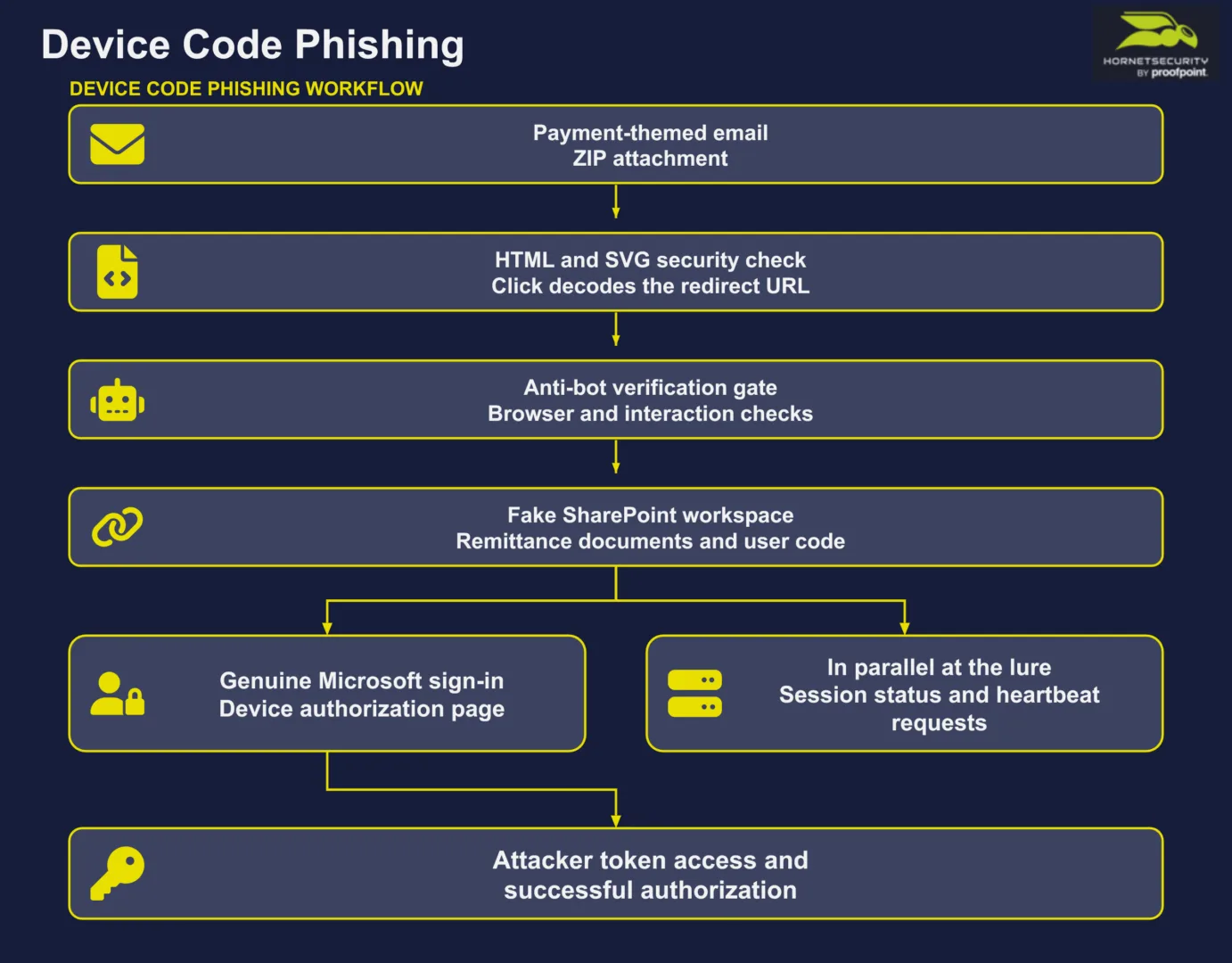
A Payment Attachment Supplies the Reason to Click
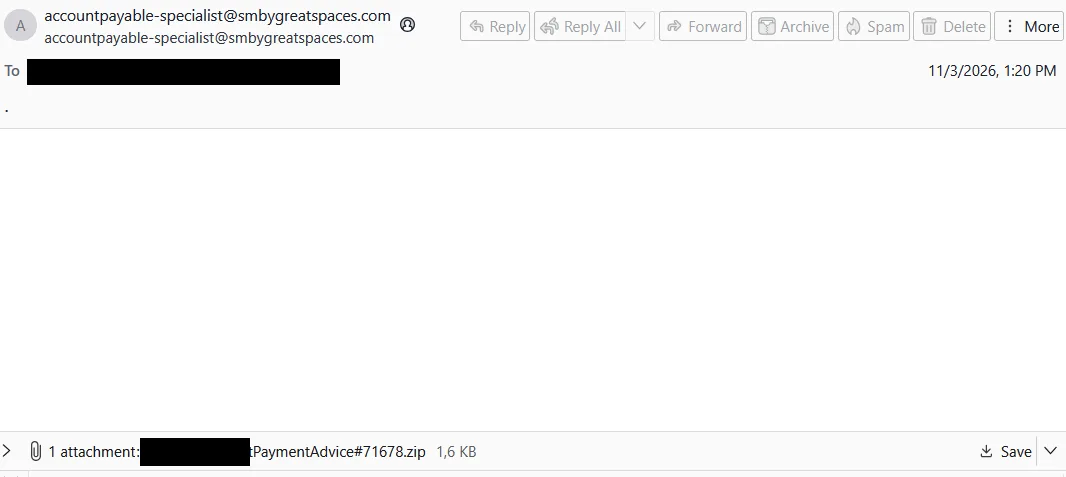
The first email was unusually sparse: its subject was a single period and its visible body contained almost no explanation. A recipient-personalized ZIP filename supplied the payment-advice pretext. The message therefore relied on the attachment’s apparent business relevance to prompt the next action.
SVG (Scalable Vector Graphics) is an XML-based image format. When opened as a document in a browser, it can include scripts that respond to user interaction. An interactive SVG redirector uses this capability to send the browser to another web page when the user clicks the image.
Inside the archive, the analyzed HTML file was actually an SVG/XML document presenting a security check and a prompt to continue. A transparent rectangle covered the canvas. Clicking that area executed JavaScript, so the apparent verification control also served as the trigger for navigation.
Our team’s static analysis revealed how the script recovered its destination. It split an encoded string into fragments, reversed alternating fragments and restored a substituted Base64 alphabet. After Base64 decoding, a repeating-key XOR transformation recovered the destination URL, which the script assigned to window.location.href. The attachment’s role was to redirect the browser to the hosted lure.
A Verification Gate Precedes the Fake Workspace
The recovered destination used the host 9l2v3vupv5.synerghylnksloads[.]cfd. During dynamic analysis, an initial gate evaluated browser-window properties and mouse or touch interaction. Its code included a branch that redirected low-scoring visits to a benign destination, giving the operator a way to divert some automated or unsuitable visits.
The analyzed browser then sent a request carrying challenge parameters and received an HTTP redirect to a keyed page on the same host. That page impersonated a SharePoint project-document workspace. It advertised remittance reports with check images and displayed a verification code alongside a copy control.
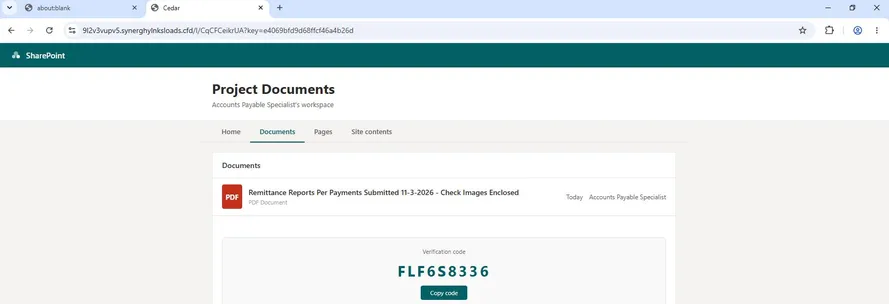
The lure instructed the recipient to open a sign-in window, enter the displayed code, authenticate with an account and return to the document tab. These instructions presented the attacker-initiated authorization request as a requirement for viewing the remittance documents.
A Genuine Microsoft Sign-In Authorizes the Requesting Client
The observed sequence reached login.microsoftonline.com/common/oauth2/deviceauth, a genuine Microsoft device-authorization page. The important distinction is who initiated the authorization request. The attacker-controlled page supplies the code and the business pretext, while Microsoft hosts the authentication experience.
In the device authorization protocol, a requesting client obtains a short user_code for the person to enter and a separate device_code used by that client to poll for tokens. When the user successfully completes authorization, the requesting client receives tokens for the granted permissions. In a phishing scenario, that client is controlled by the attacker.
The recipient completes the sign-in on a genuine Microsoft page, including any MFA requested by the service. The attack exploits the relationship between that legitimate authentication and the client that initiated the request. The origin of the code and the purpose of the sign-in are therefore critical: Microsoft’s authentic interface can be part of an attacker-directed workflow.
While the first lure remained open, it repeatedly contacted campaign endpoints under /api/status/28475 and /api/heartbeat/28475. Our teams recorded session-status responses and successful heartbeat acknowledgments. These browser-to-campaign exchanges kept the lure synchronized with its backend. In the device-authorization protocol, the requesting client separately polls Microsoft for tokens.
A Second Sample Changes the Attachment Loader
A separate November campaign used a subject announcing a scheduled electronic payment and carried SpwcinBillPaymentReports.zip. The displayed sender identity differed from the Irving Oil wording in the message’s confidentiality disclaimer. The payment subject and corporate disclaimer supplied a familiar business context for opening the attachment.


The associated HTML used a different reconstruction method. Its loader concatenated 475 obfuscated string fragments, retained hexadecimal characters, checked a checksum and decoded the bytes with a derived XOR keystream. It then inserted the recovered HTML with document.write.
The second lure again presented a SharePoint-style list of remittance documents, a verification code and instructions to authenticate through Microsoft. The browser capture shows the host ngjedt0xrv.promtateusachorloadscorp[.]sbs in the address bar. The interface’s branding and document list created the impression of a familiar workspace even though the page was hosted elsewhere.
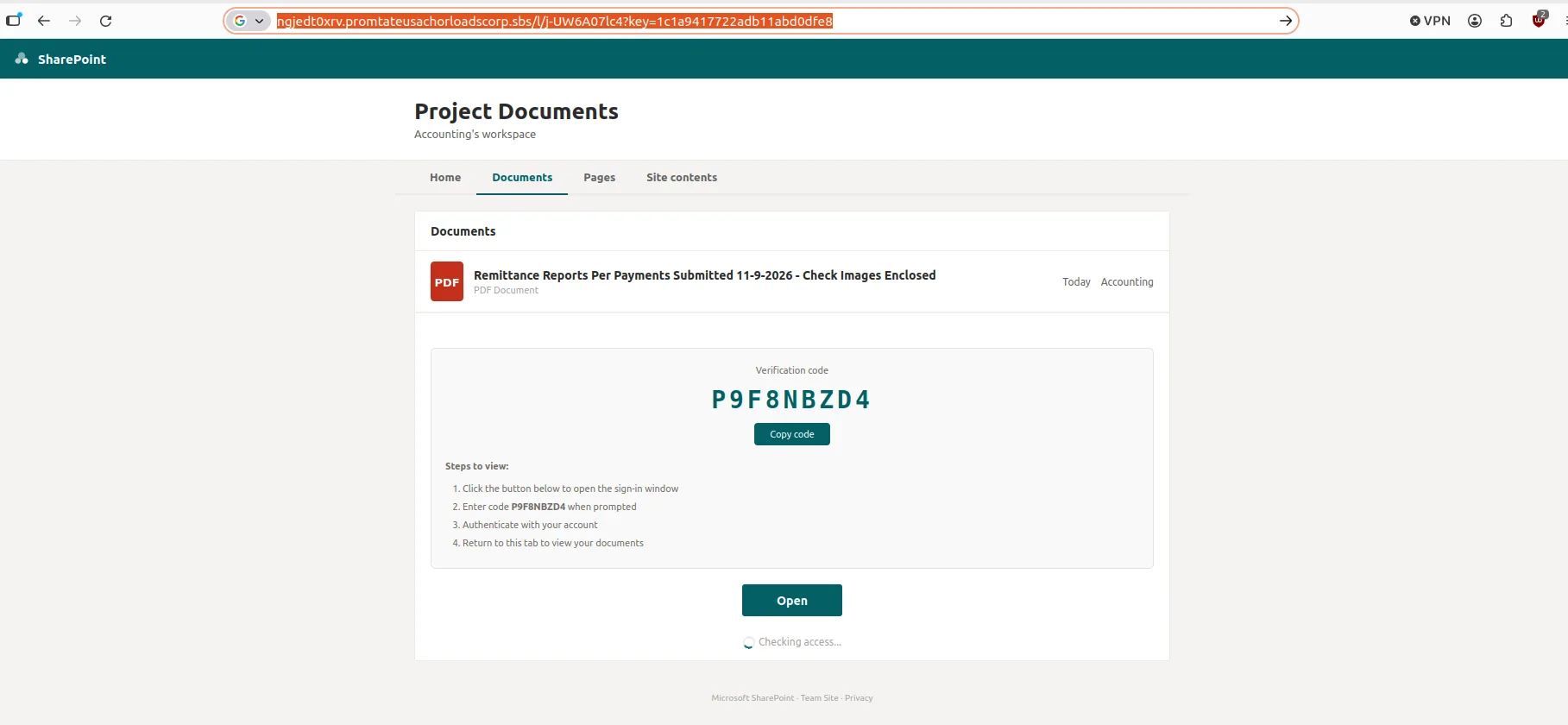
Our analysis of the decoded page identified requests for lure configuration and a device-authorization code from its backend. The code defined an immediate heartbeat followed by ten-second intervals, with session-status polling every three seconds. Its handler for a captured status hides the lure and selects a configured exit destination or displays an access-granted message. This coordination sustains the document-access pretext throughout the authorization workflow.
Other Payment Attachment Variants
Our teams also investigated payment-themed attachments using related security-check and redirection techniques. These variants show how attackers vary the email and attachment while preserving a familiar invitation to open a payment document.
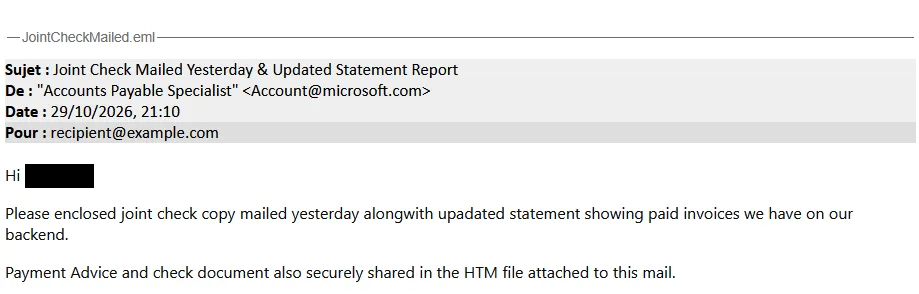
A joint-check and updated-statement lure presented an HTML attachment as securely shared payment advice. Its SVG displayed an identity-verification prompt and used fragment manipulation, a substituted Base64 alphabet and repeating-key XOR to reconstruct a destination. The resulting host, tgg5rqrdcb.synerghylnksloads[.]cfd, shares a parent domain with the first detailed case.
Another payment-advice message carried a ZIP containing an SVG page with a One tap to proceed prompt. Its click handler directed the browser through a specific Cloudflare Workers URL, adding a hosted redirect between the attachment and the next web page.
An electronic-funds-transfer message delivered ElectronicFundsTransferRemittanceAdvice.html alongside a ZIP attachment. The HTML contained another full-canvas SVG click target. Its script reversed alternating fragments, remapped Base64 characters and applied XOR before redirecting to 5txpm30dqe.krointechbillpaycheckingusalexingto[.]sbs. The visible security-check prompt concealed the attachment’s role as a browser redirector.

Detection and Protection
At the email boundary, inspect the contents of archives and HTML attachments rather than relying on their filenames. A payment-themed ZIP containing an interactive SVG redirector or an encoded document-sharing page warrants investigation. The combination of fragment reversal, substituted encoding, XOR decoding and click-triggered navigation is more useful than any one JavaScript function in isolation.
For browser and network investigations, correlate visits to the campaign hosts with device-code sign-ins and repeated requests to session-specific status and heartbeat paths. Combine domain and path matches with the account, application and timing recorded in identity telemetry to reconstruct the authorization workflow.
In Microsoft Entra sign-in logs, filter Authentication Protocol for Device code and investigate successful sign-ins that have no expected business purpose. Review the application, account, source and timing. Original transfer method can also help trace sessions that originated through device code even when a later token renewal uses another flow.
Organizations should audit legitimate device-code use and restrict it wherever possible. Microsoft documents a Conditional Access policy using Authentication flows, Device code flow and Block access. Test the policy in report-only mode, review its effects and retain carefully scoped exceptions for documented requirements and emergency access.
User guidance should explain the decision being requested: only enter a device code for a sign-in or device setup that the user intentionally started and understands. An unsolicited document-access message that supplies a code should trigger verification through a trusted channel. If a user has completed such a flow, investigate the resulting authorizations and sessions promptly.
Conclusion
The resurgence of device-code phishing in November shows how attackers combine routine payment correspondence with Microsoft’s legitimate authorization infrastructure. The obfuscated attachment initiates the journey, the counterfeit workspace supplies the business pretext, and a successful authorization grants the attacker-controlled client access through tokens. Defenders should examine the complete workflow, including why the recipient was asked to enter a code and which client initiated the request.
Indicators of Compromise
The following indicators were identified during our teams’ investigations of the November campaigns. Network indicators are defanged. File hashes identify the analyzed artifacts, while the context column describes each domain or URL’s role in the attack chain.
| Type | Value | Context |
|---|---|---|
| Domain | 9l2v3vupv5.synerghylnksloads[.]cfd | First sample: verification gate, fake SharePoint page and session endpoints. |
| URL | hxxps://9l2v3vupv5.synerghylnksloads[.]cfd/l/CqCFCeikrUA | First sample: decoded redirect destination. |
| SHA256 | bbf9f563371d6afc449c69546a4ec39e831ca18d3bf3764b7b4c27f525426140 | First sample: HTML/SVG redirector. |
| Domain | ngjedt0xrv.promtateusachorloadscorp[.]sbs | Second sample: document lure host shown in the browser capture. |
| SHA256 | d12b56f405af7fb5d80d828ccd5514e045eb9bfb3428bf77f20deca31ba5c0f7 | Second sample: SpwcinBillPaymentReports.zip. |
| SHA256 | 81f35c4a218032f44f4681e3f409ee7e024506bffc4446f7a9e7b3ce2d0ee932 | Second sample: associated HTML lure. |
| Domain | tgg5rqrdcb.synerghylnksloads[.]cfd | Joint-check variant: destination reconstructed by the SVG redirector. |
| URL | hxxps://base-hub-yw7q.p-xxorevv8.workers[.]dev/l/taaeR_gygko | Payment-advice variant: exact click-handler URL used for hosted redirection. |
| Domain | 5txpm30dqe.krointechbillpaycheckingusalexingto[.]sbs | Funds-transfer variant: destination reconstructed by the HTML/SVG redirector. |