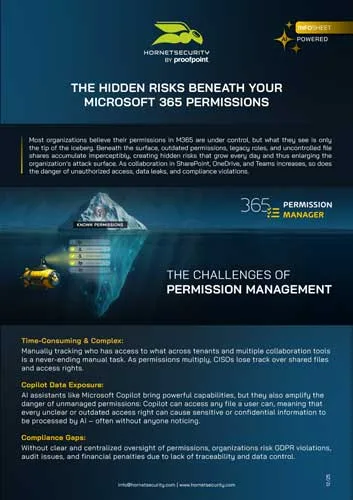
THE SHAREPOINT ICEBERG:
THE GREATEST DANGER LIES BENEATH THE SURFACE
Unknown permissions, uncontrolled access, unseen risks.
Request your free 365 Permission Manager demo!

With permissions in Microsoft 365, what you see is only the tip of the iceberg. Most permissions lie hidden, exposing your organization unnecessarily to serious risks. With 365 Permission Manager you bring light to the darkness, achieving complete transparency and control over all permissions before they turn into a security threat.
Why structured Permission Management is essential

In almost every company using Microsoft 365 and with it SharePoint, OneDrive, and Teams, an invisible risk is growing: file sharing. As a company grows, the number of shared documents, and in turn its active permissions, grows exponentially, making it nearly impossible for CISOs to keep track of all shared files and permissions.
As collaboration within M365 intensifies, the risk of data leaks grows, creating hundreds, if not thousands, of potential entry points for cybercriminals – especially when permissions are managed manually, inconsistently, or not at all. The danger: most organizations don’t even realize this problem exists, let alone its extent.
With the growing use of AI assistants such as Microsoft Copilot, productivity and collaboration in Microsoft 365 have reached a new level. But as Copilot becomes more integrated into daily workflows, the risks also grow. Copilot can access all data users have access to, meaning sensitive information can easily end up in the wrong hands. Without targeted permission management, a powerful assistant can quickly turn into an unpredictable security threat.
Copilot increases the risk of unnoticed data exposure even further
Real-world incidents demonstrate just how easily confidential information can be leaked, reinforcing the urgency of permission management:
GitHub Copilot
A vulnerability that exposed parts of private repositories, leaking sensitive data such as AWS keys – credentials granting direct access to cloud servers, databases, and applications.
Exposed Finances
A financial analyst’s prompt unintentionally revealed confidential budget data, caused by years of unmanaged access settings.
EchoLeak
Discovered by Aim Security in 2025, this zero-click AI flaw enables attackers to exfiltrate sensitive data. However, there is no evidence that this attack has been exploited in practice.
And these are just some of the known cases. In reality, countless more risks remain hidden, lurking beneath the surface.
Invisible risks. Visible consequences.

The integration of AI assistants such as Copilot has only made these dangers more visible, but the risks existed long before their introduction. Unmanaged permissions often go unnoticed until they cause costly and sometimes irreversible damage. What may seem like a purely technical issue can quickly escalate into a serious business crisis:
Data breaches & unauthorized access
Open or outdated permissions give external or internal actors access to sensitive information.
Compliance violations & fines
Lack of access control and transparency violate GDPR requirements and can lead to financial penalties in the event of security incidents.
Insider threats & accidental exposure
Employees unintentionally share sensitive files or use permissions whose scope they don’t realize.
Reputational damage & loss of trust
A single data incident can permanently damage the trust of customers, partners, and employees.
It’s time to reveal the secrets beneath the surface
Now that the risks of unmanaged M365 permissions are clear, it’s time to take back control. 365 Permission Manager provides full transparency, security, and efficient management of your Microsoft 365 permissions – across SharePoint, OneDrive, and Teams.

Your key benefits at a glance:
- Comprehensive Monitoring
Gain a complete overview of all M365 permissions for SharePoint, OneDrive, and Teams. Instantly identify which files, sites, or folders are accessible to external users or guests, including real-time alerts for external sharing. - Custom Permission Policies
Define preconfigured or fully customized policies and apply them flexibly at the site, folder, or file level. Unlike Microsoft’s standardized tools, this allows for truly granular control. - Manage Permissions at Scale
Apply changes across multiple tenants, groups, or users simultaneously. Bulk actions save time, increase compliance, and ensure consistent permission structures across your organization. - Real-Time Control & Alerts
Receive instant notifications of policy violations. Admins and CISOs can see exactly which users and files are affected, enabling immediate action to prevent data leaks. - Compliance To-Do List & Accountability
All policy violations are clearly listed. Correct them in bulk or define exceptions where necessary. Employees are automatically notified via email, promoting responsibility and awareness across all levels. - Copilot Protection
With 365 Permission Manager, you ensure that AI systems in M365, such as Copilot, only access data that has been intentionally shared. Thereby, uncontrolled data exposure or GDPR violations are prevented. - Audit & Compliance
If a user violates compliance policies, use the built-in audit function to review, approve, or reject each case.
Start managing your permissions responsibly and transparently today. 365 Permission Manager ensures your files are shared securely, visibly, and under control. External sharing remains possible, but only where it’s truly needed.
Protect your data. Prevent hidden risks.